Tag Archives: self-publishing

Quick How-To: get 1,000 Goodreads followers with 5 minutes of effort

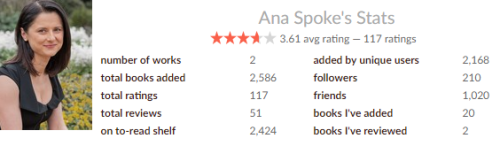
Have a gander at these here numbers: I now have 1,020 Goodreads friends!

Ana Goodreads stats

How did I manage this, you ask? Well, about a week ago, I had 200 friends, as a result of a year of giveaways (total of 8, which are also responsible for the staggering 2,424 of my books on people’s to-read shelves) and also because of two months of madness advertising #ComedyBookWeek. Then I discovered something most of you probably already know.

Goodreads lets you connect to your friends on other social platforms  en masse.

So, if you already knew that, then why didn’t you tell me? For those that didn’t, here’s how you can connect to thousands of your Twitter or Facebook friends with a few clicks (assuming you have thousands of Twitter or Facebook friends):

  1. On Goodreads, hover over your picture in the top-right corner. When a menu appears, click on “Friends.”
  2. Find this in the top-right corner of “Friends” page:                                        Ana Goodreads stats
  3. Click on each platform’s icon and send out invites by clicking on “Add Friends” button.

That’s it. Now they all will see your general updates, comments you’ve made in groups, and you can invite them to your groups or events. Like, I dunno, you can invite them to #ComedyBookWeek group. Just sayin’.

You’re welcome.

23 Comments

Filed under Self-publishing and marketing

#ComedyBookWeek review – Beaver vs. Beaver by Portia Porter, Esq.

I couldn’t help myself – despite going nuts with trying to figure out HTML and keep track of all the updates, I’ve read another book from the 117 funny books on offer at #ComedyBookWeek. This is not an ordinary event, and it features some not-so-ordinary books. It shouldn’t be surprising then, that Beaver vs, Beaver came out at me from the left field. It’s a humorous memoir of a divorce lawyer, striking out on her own for the first time, and landing her very first client – a multi-millionaire, no less. I don’t know what I expected, although it was probably something along the lines of Ally McBeal. It promised an insider look into the family law court, and I settled in, looking forward to some light reading and maybe relieving my dreams of being an attorney. ‘Cause I could totally do that. I work hard, and I can look adorable when in the right mood and viewed from the right angle.

Oh. My. God. This was so not Ally McBeal.

Yes, it’s an insight into the law practice, alright. And yes – it’s funny when Portia Porter pulls down the pants of the legal practice and reveals all of its warts. It’s like she’s the Julian Assange of family law, but without that rapey vibe. There’s the part towards the end of the book, where the narrative steps away from the main story and details some of the ways the lawyers go about screwing each other, the judge, vice versa, the client and vice versa, and various combinations of the above. Because of that, I see this book as a short course for potential clients, told in a humorous way. Portia is also a Malcolm Gladwell of sorts – educating you about something as painful and dry as divorce proceedings through storytelling and humor.

The story is told from the first person, but you get to understand what Portia in the story doesn’t yet know. It’s gut-wrenching in the way that makes people in movie theaters yell “Don’t open that door!” I actually had to stop in the middle of the book and take a walk when she did open that door – the pain of anticipating the ultimate swindle was excruciating. I don’t want to reveal too much, sufficient to say that I found the resolution of the story very satisfying.

The voice of the book is both intelligent and lighthearted:

“Lawyers on TV—at least the ones who play the good sort—never have the smallest problems with their memory and organization. All the exhibits are always at their fingertips, they never forget a date, they have the statutory Codes memorized cold, even when they must quote what is a five sub-paragraph deep citation.”

“8:55 A.M. Judge’s bench still empty. It’s just me, Ms. “Human Coil” Boom and the sheriff.
9:10 A.M. No change.
9:20 A.M. No change.
9:25 A.M. Starting to lose hope. The judge forgot about us probably.
10:10 A.M. The back door opens . . . false alarm! It’s the Judge’s Secretary Tonya, the author of the cryptic email.”

Expertly written, flowing prose has been just as expertly edited, something that is too often overlooked. I’ve learned quite a few things from reading this book – for starters, that I’m not cut out for the court. That if I ever do have to hire a lawyer, I’ll make sure I won’t have to fire him or her. Oh, and that I will have to read her other books: Can You Stiff Your Divorce Lawyer? and Alienation of Affections.

Buy Beaver vs. Beaver to read just for kicks, and then to keep on your bookshelf, you know, just in case. Buy it if you or anyone you know is considering a divorce. And, for the love of God, buy it for that bright-eyed daughter or niece of yours that is nurturing dreams of being the next Ally McBeal.

You can thank me later.

1 Comment

Filed under #ComedyBookWeek

Quick How-To: add a static welcome page to WordPress.com without losing your blog

Hi, guys!

I’ve been MIA for a couple of weeks, and for a good reason – as you’ve probably noticed, I am now running #ComedyBookWeek. It’s been a full-time job for the last month or so, what with setting up an official website, approaching 100 book bloggers, and gathering 112 (and counting) books to participate. Not to mention the daily highlights and social media – luckily I’m on leave right now, otherwise, I’d have a nervous breakdown!

Still, I had to take a little timeout and post this How-To, because it took me forever to figure out what should take you five minutes to do. If you’ve looked on #ComedyBookWeek webpage lately, you might have noticed that the front page is now a static one, showcasing all the books on offer. To see the actual blog posts, you now need to click on the “Blog” tab at the top. This makes the page look more professional from the event point of view, rather than the WordPress standard landing page being a blog. Plus, it gives more weight to the books on offer. Incidentally, this is what most professional authors do – when you go to their website, the welcome page is about the author and their books. I am going to revamp this blog in the same way, so I wanted to give you heads up and write down how I did it for #ComedyBookWeek webpage .

Please follow the steps below exactly – if you only assign the front page, you will notice that your blog will DISSAPEAR! And we don’t want that.

Here are the steps:

  1. Create a landing Page that you want to be your “front” page. For this blog, it will be my “About Ana” page. Here are all the pages used in comedybookweek.com:Add page
  2. Create a “Blog” page. Just trust me – add a new page, call it “Blog” or whatever you want, but DON’T WRITE ANYTHING in the body/text box.
  3. Now go to your WP Admin, and in Settings-Reading, assign two static pages as shown below. Assign your welcome page to “Front” and your empty “Blog” page to “Posts.”Reading settings
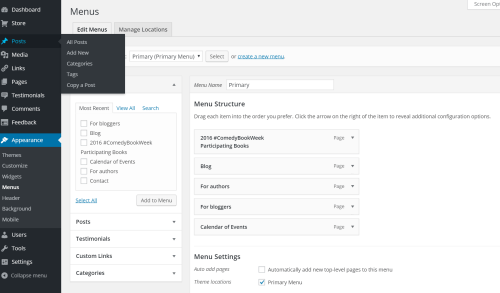
  4. In Appearance-Menus, add pages and rearrange them as desired. Here’s what #ComedyBookWeek menu looks like:Menus

That’s it!

You’re welcome 🙂

22 Comments

Filed under Self-publishing and marketing

Save $150 and a week – quick how-to format a CreateSpace book interior yourself

When I published Shizzle, Inc last year, I paid somebody to format the PDF interior layout. It cost me about $150 and a week of back-and-forth with a reputable company, that did a good job. Eventually. The problem is, now I have to pay them again because I have had the book re-edited by an American editor. And again if I want to change a single comma – they did it on a Mac, and even though they were nice enough to provide the Word file, it looks like garbage when I open it on my PC.

In case you’ve never had to deal with an interior file and don’t know what it is – it’s a PDF of your book, laid out exactly the way your book will look, from the first page to the last. It includes the title page, page numbers, book name and your name at the top of each page, drop-caps (the first letter of the chapter being ten times bigger than other letters), the exact font, and all that. It sounds easy, but it takes time to make your book look beautiful, and that’s why the pros charge you for it.

So anyway, this time around, I was determined to tackle the formatting of Indiot myself. I mean, there are templates for this kind of thing, so how difficult could it be?

Try two days of pulling hair, yelling at your computer, and yelling “I’m busy!” at the phone when it dings just as you’ve discovered an odd blank page in your document. When you (I mean, I) do anything the first time around, it takes five times longer and hurts ten times worse than it should. I spent two days working on the file but, after an emergency nap, I can assure you that it could have been done in two hours if one (I mean, I) knew what they were doing.

The following is not intended to be a complete guide, it’s more of the step-by-step blueprint of what I will do next time to complete the file formatting process. Just so that I don’t forget how I did it or what lessons I’ve learned. It assumes that you’re using Word, and none of them fancy-shmancy designer thingamajigs.

  1. Download an interior template from CreateSpace. I chose a 6×9 preformatted template. I did try to use a blank template at first, but that would require more Word skills that I currently possess. The preformatted template already looks like a book, so you can understand what it is you’re supposed to do.
  2. On the title page, type in the title and author name, changing the fonts to match the book cover.
  3. Copy and paste the copyright page and the dedication. Make sure the ISBN numbers match that of the paperback edition, not the ebook format!
  4. Type in your name and book name in the header. Title font in header should match the font used for the body of text, for a clean look. I’ve tried doing the same title font as the cover, but it’s distracting.
  5. If you have few chapters, copy and paste each chapter in place of the “placeholder chapters” text using “merge formatting” option. DO NOT use “text only” – I realised only later that it meant ALL my italicised text became un-italicised and had to re-do it ALL.
  6. If you have lots of short chapters (Lord, Indiot has 44 of those), delete all chapters except for one, the copy and paste your entire book into one chapter. You now have to manually find each chapter heading, highlight it and apply appropriate style. If that’s a pain, just do each chapter manually.
  7. When adding more chapters, make sure to include section breaks at the end of each chapter – they keep the header from appearing above your chapter title. Go to Page Layout-Page Set Up-Breaks-Next Page. DO NOT USE “Odd Page” option. It’s supposed to ensure all your chapters start on the right-hand-side of the book, but it was giving my layout seizures – the pages kept changing places as I scrolled up and down, and even made the first page disappear, giving me repetitive heart attacks. I had to painstakingly go back and re-insert all those breaks to stop the nightmare. And in any case, I have now decided not to start all chapters on the right, as I’ve previously done – a quick scan of a few professionally published titles showed that only the first chapter has to start on the right.
  8. SAVE VERSIONS AS YOU GO. You’ll thank me later.
  9. Change font to a desired one, using Styles. DO NOT highlight the text and change any attributes of it from the menu, use Styles for ALL changes.
  10. I chose Minion Pro at 11pt for the body, as it’s a bit heavier and easier to read, plus I think italics look better in it. This font, along with the template’s original Garamond is one of the most common fonts used in print books. By all means, Google more about what fonts to use, but don’t use anything too quirky – you don’t want the reader to be distracted by the actual text, you want them to be lost in the story.
  11. Change paragraph settings. With Minion Pro, I chose to make spacing 1.1 instead of single at 1.0. Again, I think it’s just a touch easier to read. I made all first lines indent at 0.2.
  12. Make sure you’ve hit “Enter” enough times after the last sentence of the previous chapter, otherwise it will center on the page. Make sure that on all pages the first sentence starts at the very top of the page.
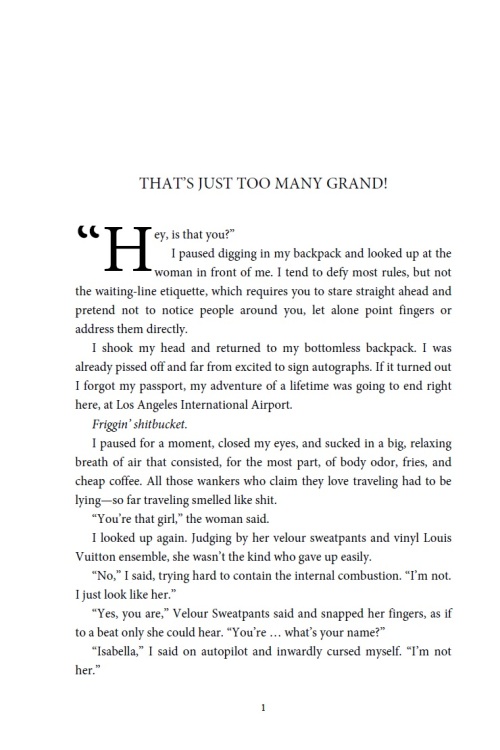
  13. Chapter titles – if you pasted each one separately, you should be okay, but if you did the whole book as one dump, highlight the chapter name text and apply the Chapter Heading style. Hit “Enter” 6 times to move the title down (or whatever number is appropriate for your font size). The idea is that each chapter starts a bit down the page – have a look at a professionally published book to see what I mean, or here is what mine looks like: Fist page of paperback
  14. Insert drop cap at the beginning of each chapter (you can opt for other ways to highlight the beginning, but I love the classic “big fat letter” look, as in the snapshot above.) Do it ONLY after you’ve done all paragraph editing, such as spacing, otherwise you’ll end up doing it all over again.
  15. Insert table of contents: the template used “chapters” instead of headings, so I could not do it automatically. I had to highlight each chapter title and click on “Add text” in the table of contents menu, then update the table. This also meant careful checking afterwards, to make sure all chapters made it into the table.
  16. DO NOT use automatic orphan/window control, instead adjust pages manually. Orphans and widows are the lonely, single lines of text either at the bottom or the top of pages. Well-formatted books don’t have those, but I allowed a few, when I thought separating a line made more of an impact with a punchline of a joke.
  17. Turn on the pilcrows and check through the whole document, making sure the section breaks are where they are supposed to be, and there are the same number of pilcrows before each new chapter, and that they are the same size and font (to make them start at the same spot on each page).
  18. Finally, READ THROUGH the entire PDF before uploading it – for some reason, italicising was dropped here and there anyway, and I managed to find even more tiny fixes. It took about eight hours, including all the fussin’ and fixin’, but was so worth it.

This is all. I will update this page if something else comes to mind, but I’ve been able to upload the final product and it looks fine in CreateSpace preview.

Now I have to order a proof copy. Wish me luck!

67 Comments

Filed under Self-publishing and marketing

ARCs and the new cover of Indiot

Another milestone ticked – I’ve sent ARCs (Advanced Review Copies) of Indiot to everyone on my “Permanent ARC List.” I was using MailChimp for the first time, so if you believe you should be on the list, but did not get an email from me, please let me know (email me on the address mentioned on the About Ana page). I will send a copy to you directly.

What is the Permanent ARC List? It’s the list of all people who have read and posted a review of Shizzle, Inc on Amazon. As a “thank you,” I will send ARCs of all Isa Maxwell Escapades to those awesome people – so if you’ve posted a review of Shizzle, Inc and would like to be on the list, please let me know.

Another milestone is that the cover and blurb on Amazon have been updated:

I wavered for so long with the cover design, it was a relief to just make the decision and move on. I may decide in the future to revamp the covers again, but I’m happy for now, so I can concentrate on writing and marketing.

And speaking of marketing, #ComedyBookWeek is blowing up – already 48 authors and over 60 books participating! If you have not yet seen it, visit www.comedybookweek.com. There’s still time to add your book or review of one of the participating books. I’m doing one myself, a review of There’s Been a Change of Plans by Amy Koko, and I can’t be happier about discovering a new favorite author.

Thank you all, and as always – please let me know what you think.

Ana


10 Comments

Filed under Self-publishing and marketing

Marketing Matters: that all-important last page of your ebook

UPDATE: I have decided to exclude picture “buttons”, as they did not embed in the text. Someone with better skills may be able to advise why, but for now, I have just included the hyperlinks. Also, I chose to include only two – a link to Amazon reviews, and one to my mailing list.

~

As I’d mentioned (read: whined about) before, I have just finished re-editing Shizzle, Inc for the fourth time, this time with an American editor. It is now nice and shiny, and free of “kerbs” and “sniggering.” All the dots are within the quotation marks, and new commas have sprung up here and there. All in all, it was worth it.

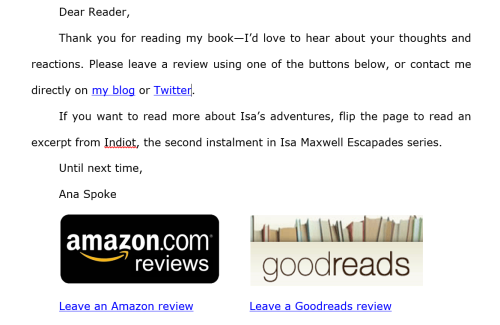
Along with the commas, the all-important last page was missing from the ebook. I’ve read countless blogs and testimonials beseeching me not to waste this valuable real estate and finally decided to beseech my readers to leave a review. This is what my last page now looks like:

Final page of Shizzle

I have not yet uploaded this new version, so would love to hear what you think. In case you’re interested in how I did the buttons, those are just images with hyperlinks. For additional safety, I’ve added hyperlinked text below the buttons (I’ve read that image hyperlinks don’t always work).

As the text suggests, I will include the first chapter of Indiot after this page, with a hyperlinked “Want to read more?” at the end.

What do you think? Have you seen something else savvy authors do at the end of their books? If so, please don’t be shy – share with everyone!

Thank you, all.


55 Comments

Filed under Self-publishing and marketing, Shizzle, Inc.

Goodreads checklist for #ComedyBookWeek

Just over three weeks left till #ComedyBookWeek goes live on 16 July. I’ve made the following checklist for myself, but if you’re participating as an author, a blogger, or supporter, you may find it useful. This could also help you develop a greater presence on Goodreads by gathering followers and friends.

Things I’ve already done:

  1. Claimed author status and added my books to Goodreads (easy to do from the Author Dashboard). If you’re completely new to Goodreads, start with this how-to guide. If you’re a blogger or supporter, you can help by adding participating books to your library shelves.
  2. Connected my blog to my Goodreads author profile, so that every WordPress post is automatically posted there. Sometimes there’s a delay, but they do come through.
  3. Created Comedy Book Week event and invited my Goodreads and Facebook friends. If you’d like to add your own event go to Upcoming Events, and click on “add an event” on the upper right page.
  4. Held seven Shizzle, Inc giveways, which have helped me gather several hundred followers and friends, and have resulted in 1,800 adds to “read” shelves. I didn’t know why that would matter until I created an event and saw that I could invite my friends. Plus, every time I post an update or a blog post is published, they all get notifications.

Things I’m going to do:

  1. List a Goodreads giveaway for Shizzle, Inc, starting on 16 July and finishing on 23 July. The ad text will begin with “As part of #ComedyBookWeek, you can win…”. If you want to list a giveaway that’s longer than a week, make sure it either starts or ends during 16-23 July, as that’s when you get the most exposure. Don’t forget to mention #ComedyBo0kWeek.
  2. Update my “General status” daily with that day’s Calendar of Events. To post a general update, go to “Home” tab, it’s on the right-hand menu, under the “currently reading” book stats.
  3. Add #CBW event to the couple of humor book groups where I’m a member.
  4. Add Goodreads tab to Facebook. Directions are at the bottom of Goodreads author page.

If anyone has other ideas on how to get the most out of Goodreads during #ComedyBookWeek, please let me know and thank you!

14 Comments

Filed under #ComedyBookWeek

New Indiot blurb – please help me choose!

We all know the importance of a good blurb – after the cover, it’s the single most powerful marketing tool for your book. So I don’t have an excuse for the current vague Indiot blurb. The good news, I’ve done some research and work on revising it. I’d love your help in choosing the final version. You can either vote:

or let me know your thoughts in the comments below. If you like some bits of both, please let me know as well.

NOTE: the final blurb will undergo copy-editing by a professional editor, who will fix all my grammar and spelling issues. I am looking more for feedback on structure, content, and voice. Does either one make you want to read the book? Do they convey the genre and style of the funny, fast-paced, action-packed actual book?

VERSION 1.

They say the road to Hell is paved with good intentions, but bad decisions will get you there even faster. Isa Maxwell has both in equal measure when she arrives in Delhi. Driven by the desire to help a mysterious prince and share her newfound wealth, she braves her first plane ride, and even makes two new friends—jewelry-draped Vivien and a bottle of Valium. Too bad she loses Vivien in the airport, and her passport somewhere on the way to the hotel.

Determined to find her way out of this predicament, Isa tries harder and harder to get help, only digging herself a bigger hole in the process. Things go from bad to worse, then worst, and finally to dire, as she encounters one wacky character after another, including a blast from the past.

Will Isa survive this mess with no passport or money or will it be the last chapter in this Indiot’s story?


VERSION 2.

What would you do if overnight, you found the wealth and notoriety you’ve been craving your whole life? Well, maybe not the whole life, but at least the first twenty years?

Isa Maxwell decided to jump on the plane to Delhi, to find a mysterious prince and help him win back his fortune from scheming uncles. Not to spend it, mind you—Isa is overcome with fantasies of helping the orphans, or poor, or whoever may need her in India. With Harden gone and everyone else nauseatingly loved up, she is also dreaming of making new friends. She finds two of those in first class—jewelry-draped Vivien and a bottle of Valium. Sadly, her drug-induced euphoria is short-lived, as she loses Vivien in the airport and her passport somewhere on the way to the hotel.

Not that big of a deal, right? The police can help. Or if not, the Embassy? Okay, the bank? Somebody? Isa hits the rock bottom, only to discover that it’s the beginning of a slide into the abyss.

Full of humor and action in equal measure, Indiot is a page-turning wild ride. Hold onto your valuables, as you meet a whole new cast of wacky characters and discover what can happen if you mix enough adrenaline with lunacy and enthusiasm.

57 Comments

Filed under Self-publishing and marketing

I wrote 2.8Kwords today. And 2.6K yesterday. What’s changed, you ask?

Well, Josh has been asking that. Every time I’ve bragged about kicking my goals the last few days, or that I’ve written almost 20K words in less than two weeks, he inevitably asks what’s changed. That’s because I’ve struggled to deliver on my ambitious long service leave writing plan, averaging only about 500 words per day, with occasional bursts of 2-3 thousand per day. Those were usually followed by days of writer’s block.

So what has changed? I decided to examine the last few months, and these are my thoughts:

1. TOOLS.

I credit Scrivener with helping me get my third novel off the ground quickly. I wrote Shizzle, Inc and Indiot in Word, which is fine, but I can only now appreciate how difficult it was to plot a full-length novel with subplots, multiple characters, and several plot twists, in a linear document. Scrivener, if you’re not familiar with the tool, allows you to chunk and organise your novel, so you have a clear “skeleton” of acts, chapters, and even scenes onto which to add finer strokes of your prose. I’m not sure why I’ve never tried it before, especially because it’s free to try for 30 days, and only costs $40 to purchase outright.

(Note: I googled and found a 20% coupon, so it only cost me $32. The coupon is WORDSWITHJAM and only works on the full version, but it may stop working soon. If that’s the case, just Google another one.)

I have also purchased a much more expensive Dragon Naturally Speaking narration software, but I’m finding that it’s difficult for me to use it at the moment. Some of it is my accent, so I will have to invest some time into training my Dragon. The other problem comes from twenty-plus years of “thinking through my fingertips.” I’m not giving up on it, though, and hey – just used it to type out this sentence!

2.  MOOD.

I had a personal drama unfold earlier this year, which meant that I spent my February crying, and March elated when it finally resolved. Try writing comedy when the world is dark and tears are literally streaming down your cheeks almost constantly. Try writing anything at all when you’re so happy, you don’t care about anything, including your goals and aspirations. I guess what I’m trying to say is that if you have pressing issues of any kind, concentrating on something else is difficult. All you get are fight-or-flight, not sit-down-and-write response.

Also, while I’ve managed to write about 30K words of Indiot in November-January, I had to eventually conclude that those particular words were garbage, and I was continuously rewriting/editing/deleting as I progressed further with the first draft. So even if I wrote 2-3K on a good day and then deleted as much of the old stuff, the resulting word count was insignificant. And that’s just the nature of writing. I’m thinking what I wrote today is pretty good, but I’m not sure how I will feel about it in another month or two.

3. ATTITUDE.

This is a weird one. Some credit is due to bad reviews and people on KBoards advising me to scrap my cover, scrap my series, and write in a different genre, because chicklit is dead. Those comments hurt, but then they give me some kind of angry energy and desire to prove those people wrong. It also helped that a few days ago I’ve downloaded DMX’s X Goin’ To Give It To Ya and I jump up and down to it whenever I’m starting to feel low. To paraphrase DMX, “Ana’s gonna give it to ya” and “First we gonna write, and then we’ll write more!” DMX is not for everyone, but damn! Listen to it enough, and next thing you know, you just want to drag race and smash things, and maybe challenge strangers to a dance off…like I said, not for everyone.

4.PRIORITIES.

I’ve let my social media stagnate a bit. What can I say, I was an addict. I still reply to messages, but only once a day, and only after I’ve done my daily writing quota. It’s great to have an active following, and I’m not going to let it stagnate into a deadpool, especially not with #ComedyBookWeek coming up, but I think I now have my priorities straight. Writing comes first. Everything else is after.

5. ROUTINE.

Ah, I left the seemingly boring, but very important thing to the last. It’s also related to setting priorities – now I get up early, have my coffee, walk the dog, and sit down to write. Today, I had my first thousand words by 9am. The feeling of accomplishment is like a drug – I had the 2.8K done by 1pm, and then decided to quit for the day, out of fear that I may burn out.  I still had the energy to burn – you should see my sparkling kitchen.

Tomorrow the goal is 3K. Ana’s goin’ to give it to ya!

59 Comments

Filed under Self-publishing and marketing

#ComedyBookWeek Calendar of Events

UPDATE: THIS PAGE HAS BEEN SUPERCEEDED by the official page. Please visit http://www.comedybookweek.com to view the up-to-date list of events.


So wonderful to see everyone excited about the big event! I have started the list of links to what will be happening each day – if you have a post/review/interview happening during 16-23 July, please let me know in the comments below, and I will add it to the Calendar.

Dear book bloggers – please make sure your review is posted on the scheduled date, or advise me if you want the date moved. Once you have a dedicated URL for the post, please advise, and I will update the link (the links are currently generic to your blog).

16 JULY

C (the happy meerkat) review of Shizzle, Inc by Ana Spoke.

Matthew Drzymala’s interview with Ana Spoke.

FB group ‘Books and Everything’ interview with Russ Colchamiro.

Kirsty McManus review of Mind if I Come In? by  K.L. Phelps and interview with the author.

17 JULY
Barb Taub’s review of Must Love Ghosts by Ani Gonzalez.

Jam (Leaves et Livres) review of Do Not Wash Hands in Plates by Barb Taub.

FB group ‘Books and Everything’ interview with J.J. Green

Matthew Drzymala’s interview with Abby Vegas.

18 JULY

Rosa Temple’s interview with Ana Spoke, author of Shizzle, Inc.

C (the happy meerkat) review of Space Adventurer #1 by Carrie Hatchett.

FB group ‘Books and Everything’ interview with M.T. McGuire.

Matt Drzymala’s interview with MTM McGuire.

19 JULY

Rosa Temple’s review of How To Cook Up A Disaster by Rachel Elizabeth Cole.

FB group ‘Books and Everything’ interview with Frankie Bow.

Matt Drzymala’s interview with Portia Porter.

20 JULY

C (the happy meerkat) review of Do Not Wash Hands in Plates by Barb Taub.

Rosa Temple’s blog – guest post by Bernadette Maycock, author of It Started with a Snub.

FB group ‘Books and Everything’ interview with Scott Burtness.

Kirsty McManus review of Shizzle, Inc by  Ana Spoke and interview with the author.

21 JULY

Jam (Leaves et Livres) review of Can You stiff Your Divorce Lawyer by Portia Porter.

Guest Post by Susan Daffron on Rosa Temple’s blog.

FB group ‘Books and Everything’ interview with Jackson Lear.

22 JULY

C (the happy meerkat) review of Kingston Raine and the Grim Reaper.

FB group ‘Books and Everything’ interview with Isa-Lee Wolf.

23 JULY

BRMaycock’s Book Blog review of Maid for Love by Victoria Van Tiem

PLANNED BUT NOT YET SCHEDULED:

Ani Gonzalez will be reviewing KL Phelps(Mind if I come in), Leigh Selfman (Haunt Flashes),  Barb Taub (Null City #1), and Shizzle, Inc.

Ingenious Cat will review Kelpie Dreams.

38 Comments

Filed under #ComedyBookWeek