Tag Archives: writer

New Rafflecopter giveaway – win one of 25 digital copies of Shizzle, Inc!

Thank you to whomever mentioned this idea in comments! I’ve decided to take a plunge, although a free one at first, and created my very first giveaway on Rafflecopter. It was ridiculously easy to set up and the giveaway is free of cost to everyone – I am on the free plan with Rafflecopter, and giving away ebooks, so it will be just a matter of time to send files to the winners. The giveaway will run for 10 days and, as always, I will update you on the stats. I will also post my thoughts on whether or not I will upgrade to a monthly plan.

This time, in addition to more reviews, I hope for an impact on social media – in order to win, one would have to either follow me on Twitter, or tweet a message (or both, if they want to increase their odds of winning). I think multiple entries are allowed, so lets see what happens – currently I have 38, 705 followers.

Have you done one of these yourself? Was it worth it?

I will also test Amazon giveaways shortly, and will write a comprehensive comparison of all three soon.

24 Comments

Filed under Self-publishing and marketing

And the winner of the free cover design competition is…

…Amir Ghazi of World of Horror! Let’s hear it for Amir, whose pitch entitled The Nightmare gathered an amazing 527 votes!

vote results

Just to remind you again, this was Amir’s winning pitch:

The Nightmare by Amir.H.Ghazi

When fourteen-year-old Allen Foster is diagnosed with parasomnia, a sleep disorder evoking vivid nightmares, he begins journaling each haunting dream on the advice of his psychiatrist, keeping the notebook safely hidden in a floorboard — that is until a new family moves into the Maine house. When Rita, the daughter of the new owners, discovers the book and begins experiencing Allen’s old nightmares, she tracks him down in an effort to rid herself of the misery, only to find he has no memory of writing them.

You can read other pitches on Who will win the free cover design? or the original post.

Thank you again to all who have participated, either by submitting a pitch or by voting for your favourite. I will run another contest in August – if you’re interested, sign up for my Don’t Miss It list (see the banner on the right).

I now have the difficult task of reaching deep down, switching my brain from the usual jokey mode, to produce the creepiest and most striking cover this book so justly deserves.

Wish me luck!

17 Comments

Filed under Self-publishing and marketing, Win a free book cover!

How to make a “floaty” banner in WordPress.com

Did you know that if you pay for the Premium account, you not only get rid of pesky third-party ads, you also get a list of benefits you are probably not using? Like CSS, or custom design?

I’m kind of excited and scared at the same time – I’m one of those people that knows how to drive cars and use computers, but not exactly sure how the cars or computers work. Still, I’m not gonna fall behind the times – I have to regularly force myself to try something new. Like buying a Surface Pro, even though it means a week of crying “Where did my file go?” and “I want my Grandpa PC back!”

This time it will be “Oh my God, what have I done to my website?”

By the way, have you noticed what I’ve done? It’s in the right top corner – see the invitation to buy my book? See how it won’t go away, no matter how fast you scroll? Cool, huh…do you want one for your website? I will walk you through it step-by step while it’s still fresh in my mind.

I started with WordPress support post on Custom design. I didn’t understand half of it, except that you can “try it now” without purchasing an upgrade, which is a good news for those with the free accounts.

I then read through some of the CSS Customization Forum, backed away from the computer, and cried quietly in the corner. That’s my process, okay? You should have seen how much I cried over essays in highschool…anyway, the Forum will be a good resource later on, when I start getting all fancy with my trickery. For now, I will climb the mountain  one step at a time. The first step I’d decided to take is create one of those (mildly obnoxious) floating invitations to buy your book or sign up for an email list. I have to credit alfageek with generously sharing the original code for an invitation to buy a book. Turns out that once you have a base to work from, learning CSS can be a lot of fun as you tinker with values and then refresh madly, to see what your tinkering has done.

Ok, now for the promised easy steps:

STEP 1. Make a widget of your banner – have a look at how to create a widget for your Amazon book or how to create a widget using Amazon affiliate link.

STEP 2. Once you have a working widget, go to the wp-admin version of your site, and click on Appearances-Customise-CSS. This is what my CSS looks like now, with custom code beginning on line 6:
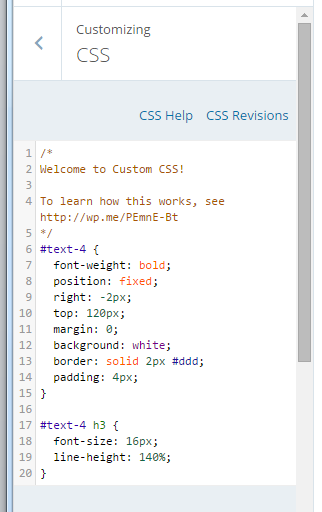
CSS code

STEP 2. Copy this code and paste it to your CSS window:

#text-4 {
font-weight: bold;
position: fixed;
right: -2px;
top: 120px;
margin: 0;
background: white;
border: solid 2px #ddd;
padding: 4px;
}

#text-4 h3 {
font-size: 16px;
line-height: 140%;
}

STEP 3. Almost finished! Change number “4” in lines 6 and 17 above to the order of your widget in the sidebar. So, if your widget is at the very top, change it to read “text-1” and so forth.

THAT’S IT! Now, the fun part! Play with the code line-by-line and see what it does:

6. “text-4” refers to my widget being #4 in the sidebar. Change number to reflect the order position of your widget.

7. optional line – if you delete it, the font will not be bold.

8. “fixed” position means it will stay put while you scroll through the page.

9. “right” can be replaced with “left” – that’s where it will appear on the page. -2px refers to how far it is from the edge. Mine has a 2px (2 pixels) border around it, so -2px shaves off the border on the right.

10. “top” can be replaced by “bottom”. Play around with the pixel number until you get it to the exact spot you want.

11.”margin” – add a margin, if you wish. I have none.

12. “background” – I have white. Have a look at CSS Tricks for codes to some alternative colors.

13. “border” – change pixel number to make it thicker, or delete this line if you don’t want a border. Change color code to match your website.

14. “padding” – controls the amount of background space around the text. Increase the number to make your banner larger, while the text stays the same.

15, 16 and 17 – I have no idea, just leave as is or play with it.

18. “font size” – did not seem to make a difference, perhaps it’s a combination of font size and line height (line #19).

19. change line height to make font larger.

Have fun!

29 Comments

Filed under Self-publishing and marketing

Even more fun with WordPress widgets: how to create an Amazon affiliate link and make a ton of cents!

So I was procrastinating today and watching my sales creep up with eReader News Today, when I noticed that they are an Amazon Affiliate. How genius, huh? Not only they take our money to advertise, they get paid by Amazon, too. Not that I mind – of all the advertising websites I’ve tried, they’ve so far delivered the most value for the money…

They also gave me an idea – I’ve decided to become an Amazon affiliate too! Cause, you know, thousands of people are clicking on the Shizzle, Inc link…well, not thousands, just 100-200 per month, but that’s a start, right? So why not make the link an affiliate one and earn 4% on whatever sales happen as a result? At least it’s an experiment and something new to learn.

First things first – sign up to be an affiliate. Because I’m already registered with Amazon, it was ridiculously easy. Took about 5 minutes and I have no problems to report, or lessons learned – just make sure to have your tax number ready. The only bugger was that I can’t get paid by direct deposit, as I’m not in the US – so I’d opted to be paid with a gift certificate.

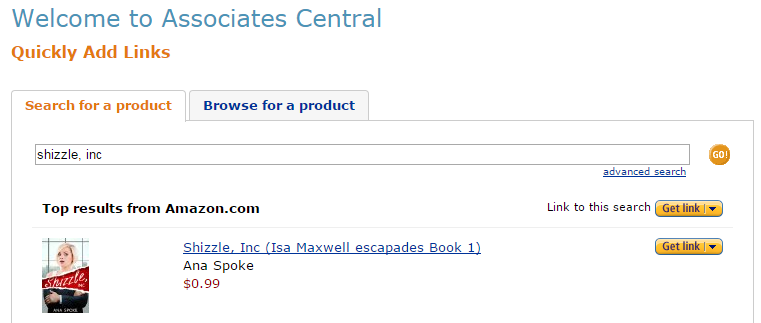
Next it came to creating a link – all you have to do is search for a product of interest, which in my case was Shizzle, Inc:

AA search results

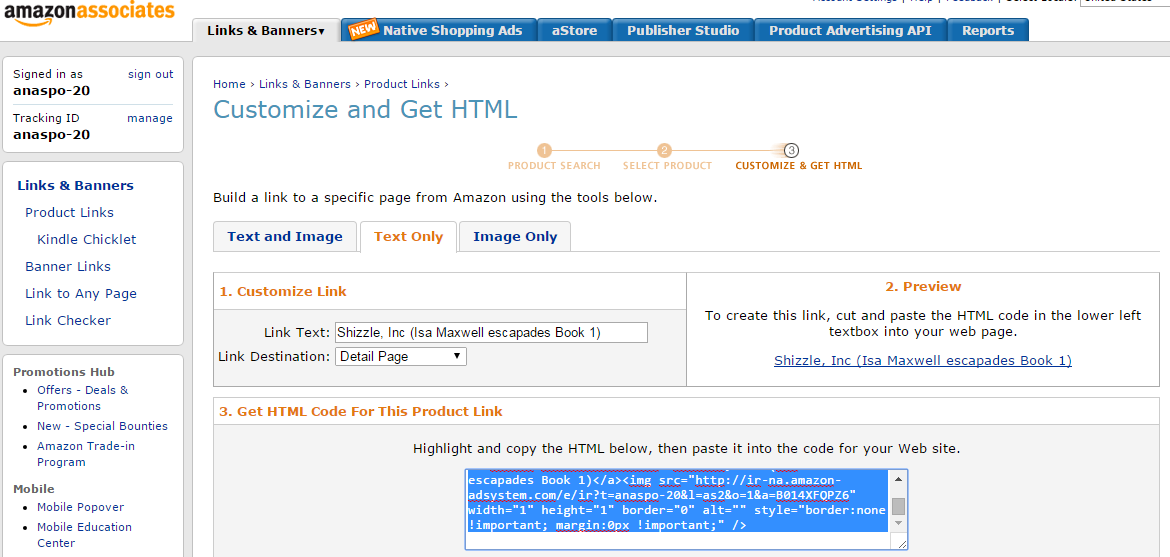
Once I’d found it, I clicked on “Get link” and chose “text only” – to make long story short, I could not get image and text html to work and have found a work-around.

AA html

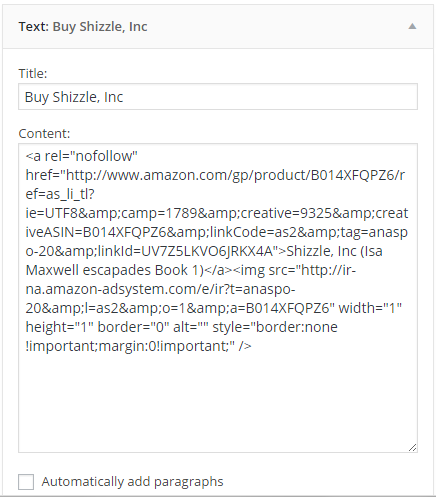
Then, I created a new “text” widget on my WordPress.com website – for more advice on creating links with text widgets see my MailChimp explained post. This is what this new widget looks like:

AA widget

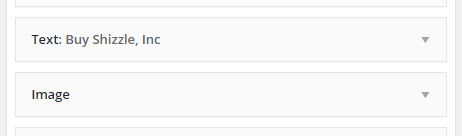
The tricky bit was how to make the link stand out. Previously, I’d created a link to Amazon using an image widget, which worked well and was easy to use – just click on the image and you are there. I didn’t want to have a “naked” link only and as mentioned before, when I pasted in “image and text” html, I ended up with a lot of code visible to everyone. So I cheated: I put a text widget with HTML in the sidebar first, followed by the image widget, but without title or url link:

Two widgets

And here you go – I now have a working affiliate link in my sidebar, which should be earning me a cool 4 cents each time someone buys a book via my website! Yay!

Have fun 🙂

72 Comments

Filed under Self-publishing and marketing

So I got myself a MailChimp…

Question is, what do I do with it? Everybody and their grandma seems to advise building an email list, but is it really that different from “subscribe to blog via email” ? I mean, would anyone want to get a newsletter from me, considering that I already document every step and event along the way? Not to mention, I can’t even figure out how to add the sign up to my WP theme…

Does anyone have experience building an email list, and if so – was it worth it? And how do I get a signup form into a template?

Sorry for this completely uninformative and uninspiring post. I promise to make it up with the next one!

75 Comments

Filed under Self-publishing and marketing

How I plan to take over the world…

…of publishing, that is!

You would not believe it, but after many an eye roll, back-an-forth negotiations, and general pouting, management approved my long service leave! Five months! Yay! (At half pay…Okay…I can deal with that…).

Five months to write and publish two sequels to Shizzle, Inc. Five months to give this writing career one hell of a try. Can I do it?

Only Microsoft Project can tell! Well, based on the following assumptions:

  1. That I can write 20K words per week (not all of the time will be spent writing).
  2. That I will have 40K words written by Feb.
  3. That I will have the first cover designed by 29 Feb.
  4. That I will do proofreading myself (and rely on “early readers” to suggest structural changes). This way I hope to reduce costs, compared to the fortune I’ve spent on Shizzle, Inc.

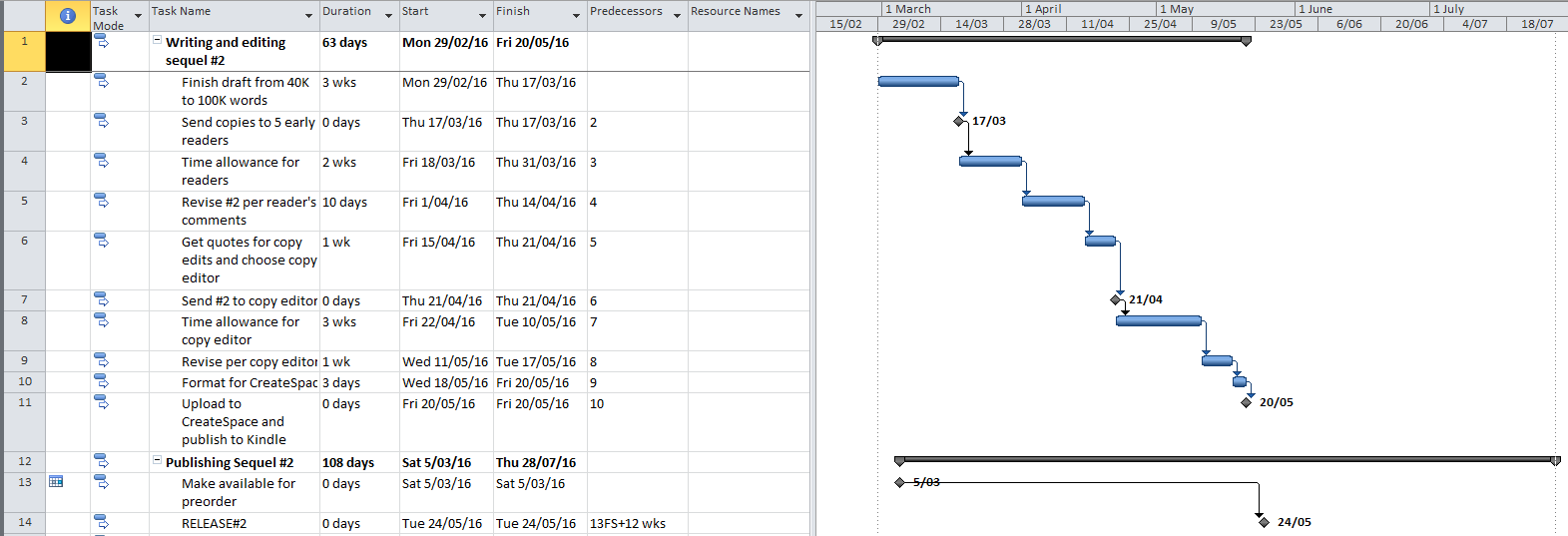
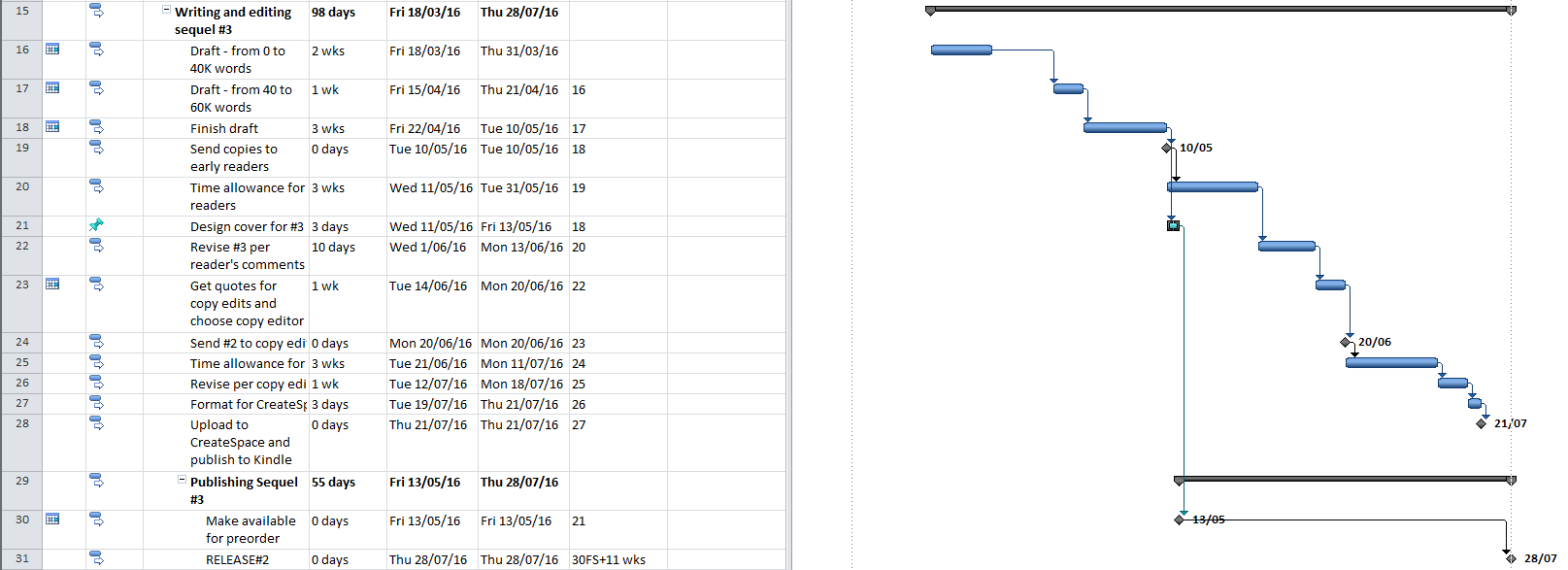
I tried staggering writing of both sequels, to allow for other (many!) tasks. This is what I came up with:

Book #2:Plan for Sequel #2

Book #3:Plan for Sequel #3

Microsoft project says I can do it!

Let me know what you think of my assumptions and timelines 🙂

83 Comments

Filed under Shizzle, Inc.

Riddle me this!

Hi, everyone,

Another day, another browse through the Amazon’s Top 100 – and I’ve noticed something I can’t explain. Can someone with more experience and insight explain this phenomena?

How can a book that is yet to be released have 1,200 positive reviews? From verified purchases? Have a look at Short Drop by Matthew FitzSimmons.

Ok, I understand the need to create pre-release buzz and actually plan on doing the same with the sequel to Shizzle, Inc – but how could there be reviews? I’d like to believe they are not fake…if so, how does one go about getting reviews on Amazon before the release day?

112 Comments

Filed under Shizzle, Inc.

Review: Shizzle Inc by Ana Spoke

Just woke up to another surprise review of Shizzle, Inc – thank you, NiaLisabeth!

Nia's avatarThe Most Sublime Things

7/10

Synopsis:

Isa Maxwell is an average busty blonde, a recent graduate of a community college, and rap-loving, gun-toting, self-proclaimed badass. More than anything else, Isa wants to be discovered, so that she can solve her financial woes and win back Brad, the love of her life.
Thanks to her clumsiness, street smarts, and an unbelievable bit of luck, Isa lands a dream job at Shizzle, Inc. Things start to look up when Mr. Hue, the playboy billionaire owner of Shizzle, Inc takes Isa under his wing. Isa even gets a number of new love interests, but all is not what it seems. In fact, absolutely nothing is what it seems.
Can Isa survive the tough world of corporate intrigue and constant looming bodily harm? Or will her efforts be the end of Shizzle, Inc and possibly her life?

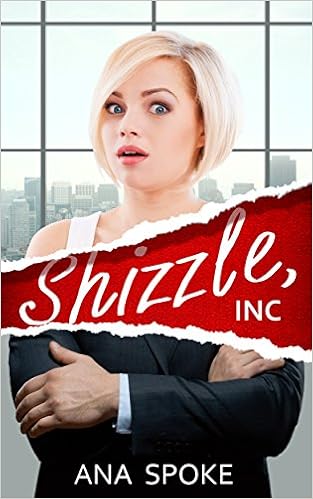
First things first, I absolutely adore the cover of this book…

View original post 449 more words

6 Comments

Filed under Shizzle, Inc.