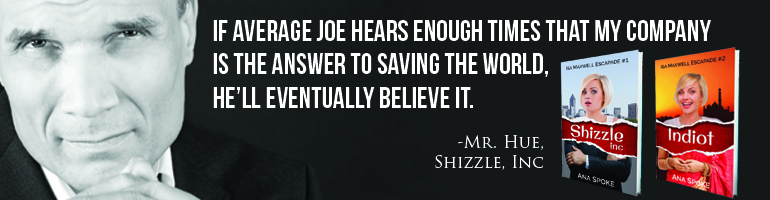
How to make a “floaty” banner in WordPress.com

Did you know that if you pay for the Premium account, you not only get rid of pesky third-party ads, you also get a list of benefits you are probably not using? Like CSS, or custom design?

I’m kind of excited and scared at the same time – I’m one of those people that knows how to drive cars and use computers, but not exactly sure how the cars or computers work. Still, I’m not gonna fall behind the times – I have to regularly force myself to try something new. Like buying a Surface Pro, even though it means a week of crying “Where did my file go?” and “I want my Grandpa PC back!”

This time it will be “Oh my God, what have I done to my website?”

By the way, have you noticed what I’ve done? It’s in the right top corner – see the invitation to buy my book? See how it won’t go away, no matter how fast you scroll? Cool, huh…do you want one for your website? I will walk you through it step-by step while it’s still fresh in my mind.

I started with WordPress support post on Custom design. I didn’t understand half of it, except that you can “try it now” without purchasing an upgrade, which is a good news for those with the free accounts.

I then read through some of the CSS Customization Forum, backed away from the computer, and cried quietly in the corner. That’s my process, okay? You should have seen how much I cried over essays in highschool…anyway, the Forum will be a good resource later on, when I start getting all fancy with my trickery. For now, I will climb the mountain  one step at a time. The first step I’d decided to take is create one of those (mildly obnoxious) floating invitations to buy your book or sign up for an email list. I have to credit alfageek with generously sharing the original code for an invitation to buy a book. Turns out that once you have a base to work from, learning CSS can be a lot of fun as you tinker with values and then refresh madly, to see what your tinkering has done.

Ok, now for the promised easy steps:

STEP 1. Make a widget of your banner – have a look at how to create a widget for your Amazon book or how to create a widget using Amazon affiliate link.

STEP 2. Once you have a working widget, go to the wp-admin version of your site, and click on Appearances-Customise-CSS. This is what my CSS looks like now, with custom code beginning on line 6:

CSS code

STEP 2. Copy this code and paste it to your CSS window:

#text-4 {
font-weight: bold;
position: fixed;
right: -2px;
top: 120px;
margin: 0;
background: white;
border: solid 2px #ddd;
padding: 4px;
}

#text-4 h3 {
font-size: 16px;
line-height: 140%;
}

STEP 3. Almost finished! Change number “4” in lines 6 and 17 above to the order of your widget in the sidebar. So, if your widget is at the very top, change it to read “text-1” and so forth.

THAT’S IT! Now, the fun part! Play with the code line-by-line and see what it does:

6. “text-4” refers to my widget being #4 in the sidebar. Change number to reflect the order position of your widget.

7. optional line – if you delete it, the font will not be bold.

8. “fixed” position means it will stay put while you scroll through the page.

9. “right” can be replaced with “left” – that’s where it will appear on the page. -2px refers to how far it is from the edge. Mine has a 2px (2 pixels) border around it, so -2px shaves off the border on the right.

10. “top” can be replaced by “bottom”. Play around with the pixel number until you get it to the exact spot you want.

11.”margin” – add a margin, if you wish. I have none.

12. “background” – I have white. Have a look at CSS Tricks for codes to some alternative colors.

13. “border” – change pixel number to make it thicker, or delete this line if you don’t want a border. Change color code to match your website.

14. “padding” – controls the amount of background space around the text. Increase the number to make your banner larger, while the text stays the same.

15, 16 and 17 – I have no idea, just leave as is or play with it.

18. “font size” – did not seem to make a difference, perhaps it’s a combination of font size and line height (line #19).

19. change line height to make font larger.

Have fun!

29 Comments

Filed under Self-publishing and marketing

Don’t fear HTML…make it work for you, one step at a time!

I was re-reading reviews of Shizzle, Inc (Isa Maxwell escapades Book 1) the other day. I do that quite often, actually – nothing like reading a good review of your book to get you out of the bed and to the keyboard. One of the reviewers mentioned that my book was somewhat similar in style to Confessions of a Shopaholic (Shopaholic, No 1). I personally think that it’s more like The Devil Wears Prada: A Novel or maybe Bridget Jones’s Diary. In any case, it was great to see my book compared to a bestseller.

You know what else is great? How easily I was able to sneak affiliate links into the paragraph above! Each one of these links is attributed to my affiliate account and could make me 4-6% on each sale. I was so excited about it, that I went back to my interview with Matthew FitzSimmons and replaced the links to his book The Short Drop with affiliate ones. It’s been months since that post, but a dozen people a week still find it from a google search for the author. It’s about time that interview started making me some money…and while I’m at it, why not sell Adult Coloring Book: Stress Relieving Animal Designs? It looks like SO much fun…
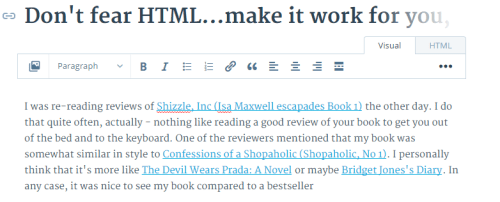
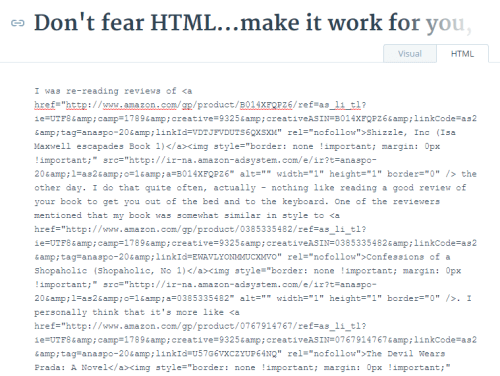
Okay, okay, I got it out of my system now! Back to my original promise – to teach you how to go nuts using affiliate links in your own posts. If you have not yet, read my how to create an affiliate link post first. Once you got an account with Amazon and can figure out how to get a link, the rest is easy – turns out, all I have to do is switch to HTML in the editor window – usually I just use the default “visual” setting. This is what the above paragraph looks like in visual (notice the highlighted “Visual” button in the top right corner):

Visual draft

…and this is what the same paragraph looks like in HTML:

HTML draft

Scary mess, right? Actually, not scary at all. You can write the entire post in “visual” setting, if you wish, then switch to HTML and plaster affiliate code in the right places. Switch back to visual, check that it looks ok, and voila! You’re in business. Literally.

If you want a bit more info on how to use HTML in WordPress.com, visit this WordPress support post.

Have fun!

27 Comments

Filed under Self-publishing and marketing

Even more fun with WordPress widgets: how to create an Amazon affiliate link and make a ton of cents!

So I was procrastinating today and watching my sales creep up with eReader News Today, when I noticed that they are an Amazon Affiliate. How genius, huh? Not only they take our money to advertise, they get paid by Amazon, too. Not that I mind – of all the advertising websites I’ve tried, they’ve so far delivered the most value for the money…

They also gave me an idea – I’ve decided to become an Amazon affiliate too! Cause, you know, thousands of people are clicking on the Shizzle, Inc link…well, not thousands, just 100-200 per month, but that’s a start, right? So why not make the link an affiliate one and earn 4% on whatever sales happen as a result? At least it’s an experiment and something new to learn.

First things first – sign up to be an affiliate. Because I’m already registered with Amazon, it was ridiculously easy. Took about 5 minutes and I have no problems to report, or lessons learned – just make sure to have your tax number ready. The only bugger was that I can’t get paid by direct deposit, as I’m not in the US – so I’d opted to be paid with a gift certificate.

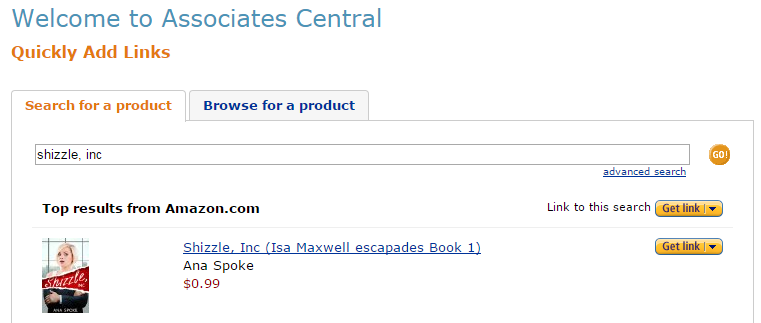
Next it came to creating a link – all you have to do is search for a product of interest, which in my case was Shizzle, Inc:

AA search results

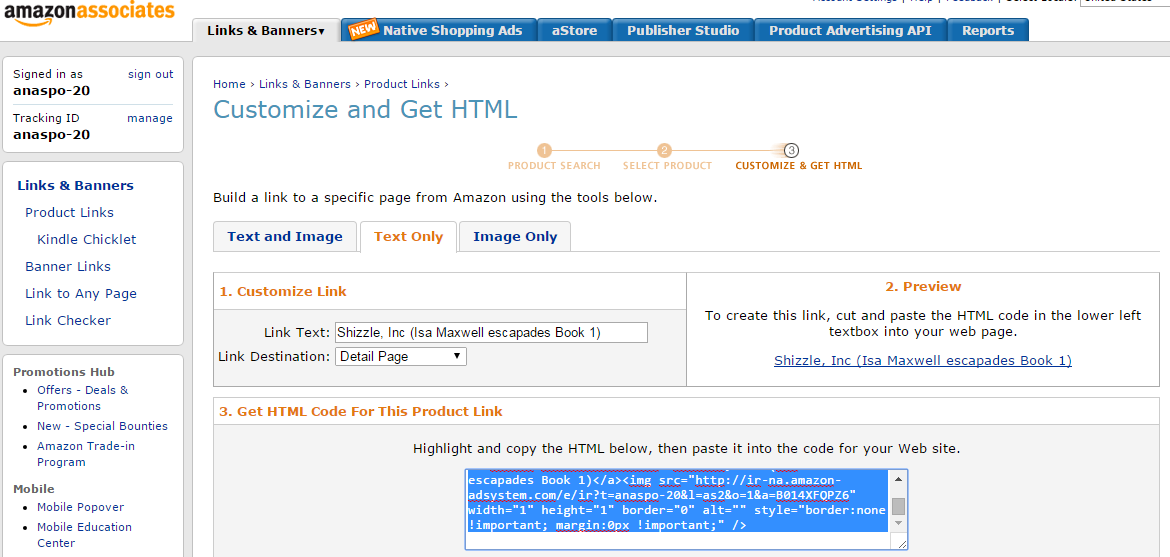
Once I’d found it, I clicked on “Get link” and chose “text only” – to make long story short, I could not get image and text html to work and have found a work-around.

AA html

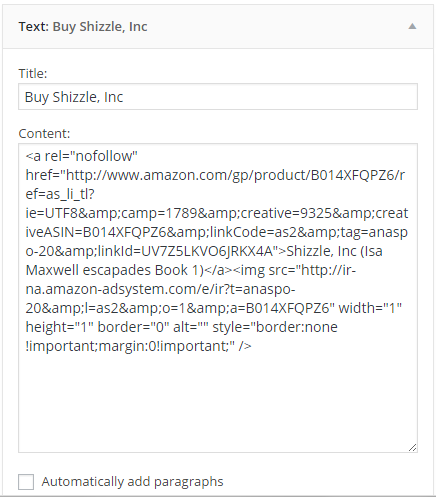
Then, I created a new “text” widget on my WordPress.com website – for more advice on creating links with text widgets see my MailChimp explained post. This is what this new widget looks like:

AA widget

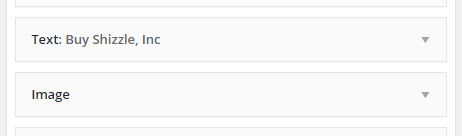
The tricky bit was how to make the link stand out. Previously, I’d created a link to Amazon using an image widget, which worked well and was easy to use – just click on the image and you are there. I didn’t want to have a “naked” link only and as mentioned before, when I pasted in “image and text” html, I ended up with a lot of code visible to everyone. So I cheated: I put a text widget with HTML in the sidebar first, followed by the image widget, but without title or url link:

Two widgets

And here you go – I now have a working affiliate link in my sidebar, which should be earning me a cool 4 cents each time someone buys a book via my website! Yay!

Have fun 🙂

72 Comments

Filed under Self-publishing and marketing

The coolest marketing idea yet!

Well, at least I think so! What makes it so good is that it should help me solve several problems most start-up authors face, namely:

  • How do I get more reviews?
  • How do I generate pre-release buzz?
  • Ho do I get people to sign up to my email list?
  • How can I do that at low or no cost?

Are you excited yet? Do you want to know what it is? Okay, okay! It’s simple:

Create a permanent ARC list.

What’s that, you ask? Let’s start with ARC – Advanced Review Copy. If you want a detailed explanation, have a look at Between The Covers. It’s basically a copy of the book made available to reviewers before the release. Using ARCs to promote your book is a well-known marketing strategy, and other blogs, such as Savvy Writers and eBooks Online or Finish Your Book have posted detailed instructions on how to do that.

Oh, you say. So then what’s so special about your idea?

Glad you’ve asked! The one thing I could not figure out was whom should I send these ARCs? I’ve even started compiling a list of book review blogs, but it turned out that lots of them have gone quiet. It was frustrating to spend so much time looking through their posts to try and figure out if they’re active, if they have a following, and how to contact them. Then it hit me.

I already have reviewers.

I have my own group, who have discovered me, bought Shizzle, Inc and posted reviews. They’ve been asking for a sequel, which means that they are the most likely people to read and review any of my future stories. Eureka!

Get to the point, you say? Okay, okay! Here it is:

If you have written a review of Shizzle, Inc and have posted it on Amazon.com or Goodreads, or both, I will send you an electronic copy of all my future books for free.

I’ve created another MailChimp list using the steps explained in my previous post. To sign up, click the link at the top of the sidebar or click here. You will need to provide a link to your review – sorry, this is the requirement to get on this super exclusive list. I reserve the right to delete any applications without a valid link. I also reserve the right to stop offering subscription to this list, so get in early!

I know what you think, how crazy am I to offer the books for free, in perpetuity. I don’t know if this is crazy or genius – time will tell, I guess. My hope is that it will get me the reviews and the buzz I need to get the momentum going. It’s also a great way to say “thank you” to the people who have taken time not only to read the book, but to help spread the word. Thank you, guys!

The sequel to Shizzle, Inc will be published in May – I will email copies with Uncorrected Proof watermark to the ARC list in April, while the sequel is on pre-order.  Let me know what you think of this plan 🙂


20 Comments

Filed under Self-publishing and marketing, Win a free book!

MailChimp signup for WordPress explained, plus get a free prequel to Shizzle, Inc!

Thank you, everyone, for providing advice and tips on how to get started with MailChimp! It motivated me not only to get my list and signup form organised, but also to finally publish a short story compilation. It’s a collection of three short stories that begin to shed some light on how Isa came to be the character that she is:

THIS IS WHY flat

What do you think of the cover? I was in a hurry, so will play with the title font more some other time. I found another image of the same model on Shutterstock – and by the way, I found a coupon for 10% off an order online, and it worked! The coupon code is “SS10”, in case you are interested. Anyway, back to This Is Why: this little book is NOT AVAILABLE ANYWHERE else – I will not be publishing it on Amazon, at least not until I come up with another half-dozen or so stories. It is my gift and bait to get you to join my brand new email list :-).

Speaking of which, yay! I already have 6 subscribers! That all happened while I was busy writing this post – and even before I’d made promises of the free stories. Wow, thank you guys so much – and if you didn’t get a copy of This Is Why, let me know, and I will email it to you. I promise not to spam you – the purpose of the list will be to make sure you don’t miss out on time-limited opportunities, like the next free cover giveaway, or a new book going on sale or given away for free. If interested, please click here or on the link at the top of the sidebar – I’m calling it my hush-hush VIP list…

It feels good to join the ranks of marketing gurus…and, as promised, this is how you can do it too:

I’d started by trying to use step by step instructions in this Ultimate Guide to Using Mailchimp and WordPress, but the code for the text widget did not work for me, instead displaying the naked code for all to see. An HTML-fluent person could fix it, but I certainly couldn’t.

So then I’d tried Aniko Carmean’s instructions and they worked beautifully! NOTE: make sure there’s no duplication of quote marks, or anything like that – at first my link sent me to an “oops” page, but I managed to resolve it by removing one duplicated quote mark. Technology…

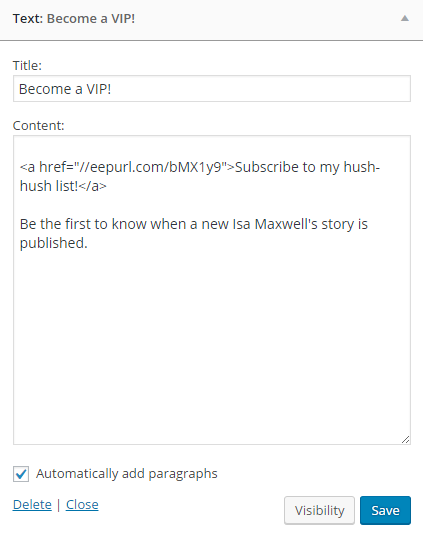
Just to make sure we’re on the same page, this is what my Text Widget looks like:

Widget text

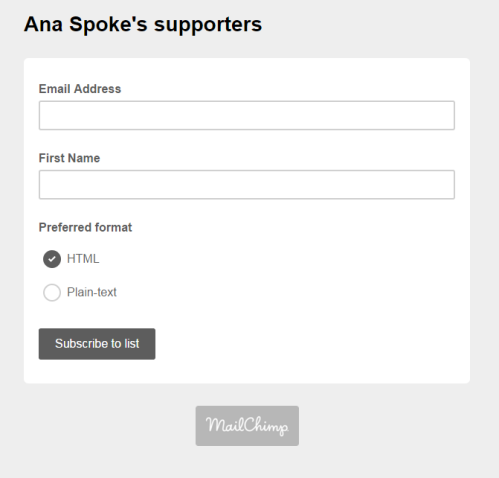
Clicking on the link will take you to this signup page. I called it Ana Spoke’s supporters – because that’s what you guys are to me:

Signup page

I chose to only ask for the email and first name, no last name or anything. As simple as possible. I also didn’t mess with any formatting, because, luckily, the font and color scheme fit nicely with my blog theme. Aniko’s directions do talk about formatting, just in case youre interested.

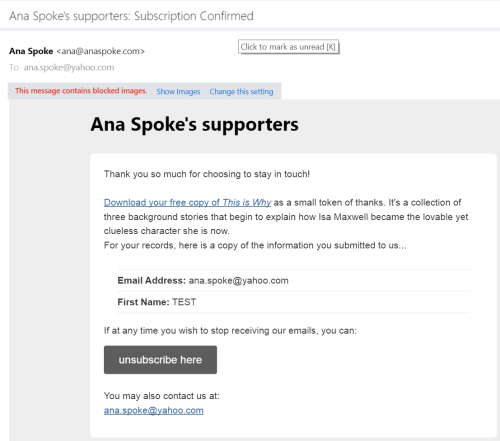
Next, I had to figure out how to provide the free prequel copy with the signup. At first it was a headache, because I knew which form to use, but could not figure out how to attach a file to it. Luckily, MailChimp has a guide on how to do just that – I can’t post a link for some reason, but just search MailChimp Help for “send a file to new subscribers” and you’re in business. Basically you need to start a “final welcome email”, click on the suggested sentence in a red dash-line box, which opens the editor similar to WP one. Write the message, then highlight the words you want to turn into the link to your file, click on the link icon above (again, so similar to WP), and choose “file” from the pull-down menu. After the user confirms their email subscription, they will receive a confirmation email that looks like this:

Screenshot (41)

Someone suggested setting up the gift in Instafreebie, which I think is a good idea. I’d decided to just send a pdf, as I’m not too worried about the copyright in this instance and wanted to keep things as simple as possible. If you decide to send subscribers a whole book, do look into Instafreebie and let us all know how it works for you.

Speaking of keeping things simple, I’d decided not to use CAPTCHA. I opted for it at first, but then, when I did a test subscription myself (which I highly recommend you do as well), I found it extremely annoying to have to pick which of the collage of photos have pancakes. Please! I wonder how many subscribers I’d lose at that point…

WORD OF CAUTION: apparently by law (CAN-SPAM Act) you’re required to display your physical address in every email and even when people subscribe! You can’t opt out of this requirement – believe me, I’ve tried. The address can be a P.O. Box, but it has to be a valid one, where you can receive mail. For now I’m using a friend’s P.O. Box, and will set up my own this week. You can put a fake address, probably, but why risk a $16,000 fine?

So there you go – it’s possible, relatively easy, and it works! I will keep monitoring the progress and keep you updated, as always. Thank you all so much!

26 Comments

Filed under Self-publishing and marketing

So I got myself a MailChimp…

Question is, what do I do with it? Everybody and their grandma seems to advise building an email list, but is it really that different from “subscribe to blog via email” ? I mean, would anyone want to get a newsletter from me, considering that I already document every step and event along the way? Not to mention, I can’t even figure out how to add the sign up to my WP theme…

Does anyone have experience building an email list, and if so – was it worth it? And how do I get a signup form into a template?

Sorry for this completely uninformative and uninspiring post. I promise to make it up with the next one!

75 Comments

Filed under Self-publishing and marketing

And this little Amazon stayed home…

Did you know this??? Not only you have to make a separate Author Page for each of the ever- multiplying Amazons, the reviews of your book may or may not cross-appear on other sites?

I certainly didn’t, at least not until I started drafting a review request this afternoon (a post on how I plan to get “official” reviews is coming up soon). In copying Rachel Abbott’s flyer, I noticed that she posted different numbers for the American and British sites.

Huh?

Well, whaddaya know? I thought Shizzle, Inc had 26 reviews, but that’s on the US siteUK site has 5 reviews, which are the same as on the US site. I don’t know if those kind souls posted their reviews twice, or if Brits are ahead of others in terms of integration. Aussies haven’t bothered to post any reviews, and Canadians didn’t get the joke. India is also laying low – c’mon, guys, I know that at least three of you have bought it!

Not only that, the book has different ratings on each of the sites! At this exact moment sales are slow, as none of the January paid promos kicked in yet and I’m selling about 0.5 copies per day on the back of Twitter quotes. The ratings are as follows:

US: 465 in Satire

UK: 385 in Satire

Canada: 259,502 overall, doesn’t have a subcategory

Australia: 1,234 in Humour

India: 58,750 overall – best overall rating.

Fascinating, isn’t it? While the highest I ever got was #9 on the US Amazon bestseller list, I may have been the bestselling author in UK!

Anyway, just thought you should know. Check, quick – you might be a bestselling author in India!

60 Comments

Filed under Self-publishing and marketing

New Goodreads Giveaway – a signed copy for anyone in the world! Plus, results of the previous one and a nifty spreadsheet to boot…

Hi, everyone! Just a quick one to let you know that you can enter on Goodreads to win a free AUTOGRAPHED copy of Shizzle, Inc! This time, I’ve opened the giveaway to the entire world, but it will run only for two weeks. I have updated the link in the sidebar, too.

And just in case you are wondering, here are the stats for the last one, which was for 5 unsigned copies for US, UK, Canada or Australia residents only:

Length: 22 days

People requesting: 815 (although it now says 813)

New added: 353

New additions on “to read” shelves: 342

I have calculated that each added “to read” book cost me about 12 cents. So far they have not converted to “currently reading”, although there has been some activity in the end of December – I may be bold and attribute 5 sales to this giveaway.

True to form, I have started a spreadsheet to keep track of the data – I will try to figure out the following:

  1. Any impact on sales
  2. Any impact on new reviews
  3. Cost per “to read” addition

Isn’t she beautiful?

Goodreads giveaways

You can download: Shizzle Goodreads giveaways spreadsheet if you’d like to track your own giveaway data.

As always, your experience and opinions on Goodreads giveaways value for money is welcome!

30 Comments

Filed under Self-publishing and marketing

Review of December’s marketing blitz –

I finally got a chance to update  The Most Super-Duper, Exhaustive, Comprehensive, and Current Listing of Free and Paid Book Advertising Websites and Ideas with the results of December’s online marketing blitz. As announced in the last update, the December’s blitz/full-on war plan was as follows:

  • 5 December – second chance for Bargain Booksy. They were nice enough to give me $25 credit for the disappointing YA audience promo, so I’m trying the chicklit audience. Cost – $70 (minus the $25 credit).
  • 5-6 December – applied to Read Cheaply. Not sure if this will work, as they want a limited-time offer and Shizzle, Inc has been on sale for many weeks.
  • 7-8 December – Read Free. Cost: free!
  • 9 December – Free Kindle Books and Tips. Cost – $25.
  • 11 December – Reading Deals. Cost: free!
  • 12 December – BookHearts. Cost – $5.
  • 14 December – eBook Lister. Cost – $25.
  • 15 December – BookSends. Cost – $30.
  • 17 December – Digital Book Today (Deal of the Day). Cost – $30.

Since the picture is worth a thousand words, here are the results at a glance:

Screenshot (39)

And now, my opinions, in hopefully under a thousand words:

  1. Bargain Booksy. Once again, a disappointing 15 copies sold, although there was a big jump in pages read the next day. AMAZINGLY, though – after I’d contacted them again, they’ve refunded BOTH of my purchases. So only a net gain to me, although I kinda have a feeling I may not be welcome to advertise with them again…will try again in a while, when I have a sequel and advertise the first installment for free.
  2. Read Cheaply – I will have to test them again, as it appears I did not make it on the list – can’t find the confirmation email. proof you have to write everything down as it happens!
  3. Read Free – several copies sold! Hey, it was free, so they go onto my “good list”.
  4. Free Kindle Books and Tips – 18 sales on the day and 6 sales the day after. Not terribly impressive at the cost of $25, but I might try them again.
  5. Reading Deals – did not happen as I wanted to add links to other platforms, they’d asked me to reapply, and then did not have a slot. To be tested again.
  6. BookHearts – did not impress me, with 6 sales on the day at a cost of $5. I’m giving them another chance in January, to test if December was a bad month for eBooks.
  7. eBook Lister – I have contacted them to complain that the $25 payment only got me 3 sales. Not sure what happened, good thing I’m writing this update, because the issue slipped under the radar for me. Will update as to their response.
  8. BookSends – 22 sales on the day, but not enough at the cost of $30. Might give them another chance.
  9. Digital Book Today (Deal of the Day) – pathetic 8 copies sold at a cost of $30. has anyone had a good result with them? I had high hopes for this one. I have emailed them and they responded promptly, refunding $15, but claiming that my 40-60 sales per day with eReader News were probably because of other promos I had at the same time. Nope – I’m a researcher, so I know how to control factors (when I remember to do that…).

Here is what’s planned for January (so far, I will update this post as I make further plans, and as usual – will tweet live scores on @spokeana):

  1. 9 January – another chance for BookHearts, a subsidiary of Choosy Bookworm. Guaranteed feature, cost (on sale): $5. Not confirmed yet, although the payment has been made – they confirm on Fridays only. UPDATE: only 2 sales, a complete disappointment. After two emails it did turn out that they did not feature me on 9 January after all.
  2. 14 January – BKnights via Fiverr: only $5, mixed reviews.
  3. 16 January – Choosy Bookworm. Guaranteed feature, cost (on sale): $19. I tried to book it, but once I got to the paypal checkout, it reverted to $25. I’ve emailed them and was advised to “donate” $19, which I did. They confirmed the spot several days later.
  4. 18 January – BookHearts listed me in place of the earlier booking. I got only 5 sales.
  5. 19 January – I screwed up and did 2 giveaways. I will need to re-run and re-test Buck Books – the link is to their policies, but to apply to advertise you actually need to contact Jennifer directly on jennaputt@gmail.com. Claim to have 42,000 subscribers. Cost – $12. I also did eReader News Today again, at $30. Total sales were 44 on the day, plus about 2,000 pages read in the next few days.
  6. Read Cheaply – TBD.
  7. Reading Deals – TBD.
  8. Read Free – TBD.
  9. 31 January – Betty Book Freak. Cost: $12.
  10. 2 February – eBook Soda. Cost: $15.
  11. Kindle Nation Daily – sold out! Scheduled on 12 April.

In related news, the above graph makes me wish desperately to return to KU – I miss those pages! I will probably do this by the end of the month, so if you want to get Shizzle, Inc on Kobo, please do that now!

Looking forward to your comments and experiences. If you want to suggest an advertising site I have not yet tried, please do so!

31 Comments

Filed under Self-publishing and marketing

This is how you get your book onto a bookstore shelf

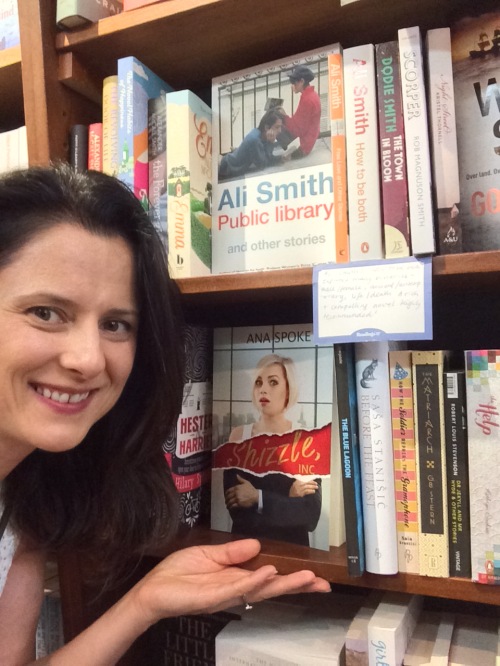
You walk in and hand it to them. Well, not quite that easy, but close. I’m exhausted from jumping up and down over here – Shizzle, Inc is now available at Readings St Kilda (that’s in Melbourne, Australia). How’s this for starting 2016 with a bang:

Book on the shelf

I always wanted to get my book into a brick-and-mortar bookstore, but did not have a plan on how I was going to get this feat accomplished. My general feeling after reading online articles was that it’s very hard for self-published authors to do so. Perhaps it is, if you expect the bookstore buyers to order books from CreateSpace, but NOT if you are willing to be a supplier yourself, and to sell on consignment (this means you don’t get paid until the book is sold, and the store reserves the right to return the stock to you without payment, if it does not sell).

On Saturday, I was catching up with my sister for a coffee on the famous Acland street in St Kilda, when I’d decided to mix in some business and stop by Readings to enquire about selling books on consignment. I was told to come back on Monday to talk to the store manager, and that they “do it all the time”.

I could hardly wait till Monday, and showed up at the store with trepidation and a paperback in hand. The store manager turned out to be this gorgeous creature called Amy. She not only agreed to take the book (after a brief glance through, probably to check the print quality), she asked for three more copies to “give it some shelf presence”. Needless to say, I was back in a couple of hours with more books, an invoice, and signed agreement. Amy suggested that I should price the book “under $29” (all prices stated are in Australian dollars). I almost fainted and said I was thinking about $19.99 at most, and she seconded that motion. Readings take 40% on top of your “wholesale” price, which I set at $14.27 to get the overall $19.99. It costs me just about $8 per book, depending on the conversion rate, so my profit before tax is just over $6, which makes me happy indeed. Also, I just found out today that Lightning Source now prints B&W books in Victoria, so once I get that sorted, my per-copy price will come down to a mere $5.30!

The same process was a bit more difficult with the buyer for the Readings Carlton, who also happens to be the buyer for Readings in the State Library. He happily agreed to take a copy for review, but warned me that it will take him a week to get back to me. Fingers crossed.

I also have in my sights another Readings and two Dymocks buyers, which together cover about half-dozen stores. I’m not too thrilled to have to keep track of multiple venues, but that hardly marrs the excitement of having my actual, physical book in an actual, physical store, where people may discover it just by browsing.

Of course, I can’t do the same in the US stores, or at least I have not yet come up with a strategy. At this point I’m thinking of contacting a few stores, arranging for 4-5 copies at a time to be printed and sent to them directly (if they agree), and just taking the risk that the books will not sell. In the US, without the international shipping, a book will cost me about $6-7 AUD, so I could take that risk, unless anybody has a genius idea for me?

Would love to hear from any self-published authors with books in the US bookstores, and thank you, everyone, again for such beautiful comments and thanks on my previous post. You have no idea how motivational it is for me to continue going – in fact, it was what got me to punch out 2,000 words yesterday and 2,800 words today! Thank you all so very, very much 🙂

145 Comments

Filed under Self-publishing and marketing