Tag Archives: writing

5 stars for Shizzle, Inc!

I’ve been waiting for this milestone with bated breath – first independent review on Amazon.  Imagine the surprise of waking up to five gold stars:

image

The reviewer read the book in one night and “never laughed so hard in my life.” I’ve never squealed so much in my life 🙂 Can’t stop reading and re-reading it 🙂 Thank you so much, Dear Reader.

Have a great weekend, everyone. I gotta go read the review. Just this one last time…

73 Comments

Filed under Self-publishing and marketing

Get Shizzle, Inc for free – my “thank you” to all of you!

Hi, everybody,

Thank you again for helping me make Shizzle, Inc happen – you’ve been with me while I was writing it, gave me advice when I was pulling my hair out during editing, and you even bought copies of my first baby, catapulting it to Amazon’s Humour Bestseller List within the first week (even if it was there only for a few hours).

I was wearing my fingers raw typing endless mad “thank you”s when I realised that no amount of exclamation marks, or even the cutest emojis can convey my gratitude. I also realised that the best way to thank someone is with stuff. Since I’m far away, don’t have much stuff to begin with, and really need the stuff I already got, I want to thank you with free copies of Shizzle, Inc. I’ve scheduled the promo to be on Amazon this weekend, although I’m buffled as to which time zone it will be. It’s a fair bet that on Saturday afternoon you should be able to download a copy. If you’ve already bought a copy, thank you double – and maybe tell your friends about the promo.

Thank you again, and please let me know what you think 🙂

Big, big hugs.

30 Comments

Filed under Shizzle, Inc.

Shizzle, Inc is on Amazon Kindle bestseller list!!!

Aaaaaa!!! I was just climbing into bed to start working on my blog tour spreadsheet and decided to stare at my Amazon link one more time. I’m tired after a full day of spreadsheeting and bullshitting at work, so I thought seeing Isa’s face would give me the much-needed boost. Then I noticed this:

Screenshot (13)

This must be some kind of a mistake, I thought. So I clicked on a link, which took me to Top 100 Paid Titles in Humour. And there she was, my creation, with a number 72 next to it:

Screenshot (12)

I’m speechless. Good thing that I can still type, so that I can “say” thank you to those who bought my book. Regardless of what happens next, you’ve made my dream come true.

Big, big hugs.

Ana

84 Comments

Filed under Self-publishing and marketing, Shizzle, Inc.

Anyone wants to host my blog tour?

Hi, everyone,

With the publishing rush almost behind me (still need to fix a couple of formatting issues), I’m looking forward to the next phase – marketing and shameless promotion. On my list of things to do is a blog tour – would anyone be interested in hosting my guest blog or doing an interview? I would offer to host yours in exchange. Probably worth mentioning that I’m not interested in paid reviews, only the genuine ones.

Please let me know and thanks again for your support!

127 Comments

Filed under Shizzle, Inc.

Quick How-to: download a free Kindle app

Hi, everyone,

I’m so glad to hear that my little post on using an image widget to link to your Amazon book has helped so many people! I thought I would share with you how I’ve used the exact same process to make a link to the Kindle download page. Several people have asked me for a print copy of Shizzle, Inc because they don’t have a Kindle. I’m about to embark on a process of publishing a paperback, but you may not be aware that you no longer have to buy a Kindle. You can download a free Kindle app  for your smartphone or tablet.

I have put a link to the above Kindle download page into my sidebar as well, right below the link to Shizzle, Inc on Amazon.

Hope this helps too!

12 Comments

Filed under Self-publishing and marketing

Quick How-To: adding a link to Amazon from your WordPress.com blog

You may have noticed that at the top of this blog’s right-hand sidebar there’s now a pic of the Shizzle, Inc cover with an invitation to download. If you click on it, it will take you straight to Amazon Kindle (the American one).

You may also wonder why I haven’t done it to begin with, as soon as the novel was published. The answer is, I couldn’t. In my naivete, I assumed that there would be an easy-to-use widget like the one WordPress.com has for Goodreads, but there isn’t one. I don’t know why. Maybe WordPress and Amazon have had a falling out, Like Paris Hilton and Nicole Richie. All I know is that setting up this little link was a pain.

I won’t take you through everything that I had to go through – suffices to say that there’s A LOT of useless, outdated advice out there. In summary, THIS WILL NOT WORK:

  • Trying to insert HTML code, as per Kindle own instructions. This is probably meant for WordPress.org websites.
  • Trying to use Text Widget.
  • Trying to use any other widget, like Goodreads, and posting a url somewhere. (Ok, so it was a stupid idea, but innovative!)
  • Crying.

JUST DO THIS:

1.  Add an image of your cover to your media library (see Media in Admin sidebar).

2.  Add an Image Widget (go to Appearance – Widgets in Admin sidebar). The dialog box will look like this:
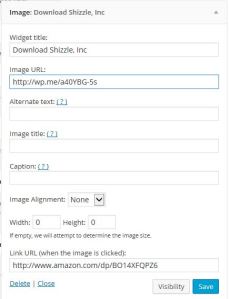
Capture of image widget

3.  Put a widget title in, if desired. I put in “Download Shizzle, Inc.

4. Now go back to your media library, find your cover image and double-click on it. You will see this:
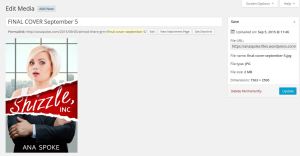
Capture of image in image library

See the box in the top right corner? Copy THAT url (ignore the permalink or the “shortlink”).

5. Paste the url in your Image Widget.

6. Save and move the widget up in your sidebar (if desired).

7. Go back to your website and admire the results!

Hope this has helped or will help you in the future. It will certainly help me when I get to post my second novel, cause I’m guaranteed to forget it all by then.

51 Comments

Filed under Self-publishing and marketing

Post-launch update

Hi, everyone! Thank you so much for all the good wishes and support – and thank you triple to those who bought my book!!

It’s been quite a ride – the adrenaline rush of finally getting it there, the rush of checking and rechecking stats, details, replying to blog comments, and updating my family with blow-by-blow accounts of progress. I was so deep into the lala-land that going to work this morning was like waking up from a dream. And I wasn’t happy – if anything, these last few days proved to me that I want to be a writer and create comedies, not more spreadsheets and reports. It looks like Fate has the same idea, as I’ve already missed out on one of those two jobs I was so excited about, and it doesn’t look like I’m getting the second one either.

But enough about reality, let me have one more check of stats…here we go, the results of the first day or two:

  • Five books sold! And only two of those to friends or family – the other three bought in the US and Great Britain – thank you again 🙂 Here’s what the sales page looks like:

sales day 1

  • The initial sales rankings prove the importance of choosing just the right category for your book:

Sales rank - benchmark day 1

  • New record for the blog – 429 views in one day!

Screenshot (10)

I’ve also had a few issues/learned a few things:

  • Even though I’ve done page breaks, the text runs together, without any blank space to separate chapters. I’m not sure if this is actually an issue, or if that’s what ebooks look like (will have to check a few that are definitely not self-published). Also, I don’t have a real Kindle – how does it look on the proper Kindle device?
  • There was no need to worry about who the publisher would be – I’ve put Ana Spoke as a publisher, but it’s still “sold by Amazon Digital Services.”

Publisher vs sold by

  • The text lines in Kindle app are spaced too close for my liking – it seems that whatever spacing you choose in Word does not translate.

I’m so exhausted and emotionally wiped from the effort of this last weekend, that I could not bring myself to research any of those or attempt to fix them, but it’s a project for later on this week. Another project for this week is to create an author page and add a bio and a professional headshot – I have a photoshoot on Saturday with a friend who just happens to be a professional photographer. I will also post a review of Grammarly and results of my current marketing gimmick – stay tuned 🙂

41 Comments

Filed under Shizzle, Inc.

It’s alive!


I mean, live! Isa Maxwell’s come to life on Amazon Kindle

Thank you Dr. Meg for checking and letting me know, otherwise I would have been sulking for hours…

Thank you so much, everyone, it’s finally happened. Have a great day/night, I’m off to buy a lottery ticket!


60 Comments

Filed under Self-publishing and marketing

Almost there…grrrr!

I have hit “Publish”! Slightly anti-climatic, because now I have to WAIT FOR 12 HOURS!!!

I think I’ve read about it before, but chose to forget that the title does not appear in Amazon instantly. They’re probably checking it for profanities (check!), drug use (check!), and smut (not really, but certainly sex references). Not sure why, considering the stuff that gets published these days. I would probably give it a PG-13 rating.

At least I get to show you my slightly improved (I think) cover:

FINAL COVER September 5

I have given up on adding color to my name – every single one I’ve tried made my last name completely disappear from the thumbnail. Finally I decided to go with “simpler is better” and made it all white. I’ve played with the whole thing for a couple of hours, but the only other change that’s happened is the title font. I’ve ended up printing the cover, and then tracing the name with a flat-tip marker, hopefully giving it a bit more “handwritten” look. Then it was a matter of scanning it in and changing color to white, and bam! My own font 🙂

Ok, so it’s once again “T-minus 12 hours and counting.” Damn it!

50 Comments

Filed under Self-publishing and marketing, Shizzle, Inc.

T-minus 12 hours and counting! Plus some random Kindle formatting tips..

Today I’ve uploaded Shizzle, Inc text to Amazon. My whole body was shaking as I did it. About half a dozen times.

Turns out that my premonitions about formatting mishaps were true. There were not that many, and I resolved everything in a space of a couple of hours, but here’s what I’ve learned in the process:

First, the good news:

  1. Uploading your book to Amazon is RIDICULOUSLY EASY. Fear not if you’ve never done it before. Assuming you already have an Amazon account you’ve used to purchase books. Otherwise you have to set one up, and it would probably take twice as long. It’s literally a couple of pages and takes about 10-15 minutes. You can preview your text, make any changes in your Word file and upload the new version (takes about a minute).
  2. Note: you can’t have multiple accounts with Amazon. If you use a pen name, it would be a matter of setting up an author page under the pen name, which I’m yet to do.
  3. If you are a first timer, like me, use Word to write your book. I can’t really talk about Scrivner since I’ve never used it, but why complicate something that is already complicated enough? I credit the relatively easy conversion of my text with the fact that I’ve used good ol’ Word.

The not so good news:

  1. I’ve spent an exuberant amount of time fussing over the drop caps and inserting them into text at the beginning of chapters and then again at scene changes. I’ve previously used asterisks in the middle of the page to signal a change of scene. Finding and replacing them was a lot of work, so you can imagine my disappointment when in Kindle they displayed so far below the first line, they looked like “buried caps.” I tried googling solutions, but the consensus was JUST DON’T DO IT. So I spent more time going back and trying to figure out how to highlight the first line/first letter. In the end, I’ve decided to do nothing.
  2. You don’t need to stress over the fonts because Kindle will translate whatever carefully chosen font into its own standard. This could even be considered good news, if IT WAS BROUGHT TO MY ATTENTION LAST WEEK, before I spent hours researching, changing, trying out, and changing the font again.
  3. Make sure that you use the style “Headings” for your chapter names and not “Chapters”. Otherwise your table of contents will be empty. Hey, it’s an easy mistake to make! I actually decided to take “Chapter XX” out altogether in the end, and I think it makes for a cleaner, simpler presentation.

The most amazing news:

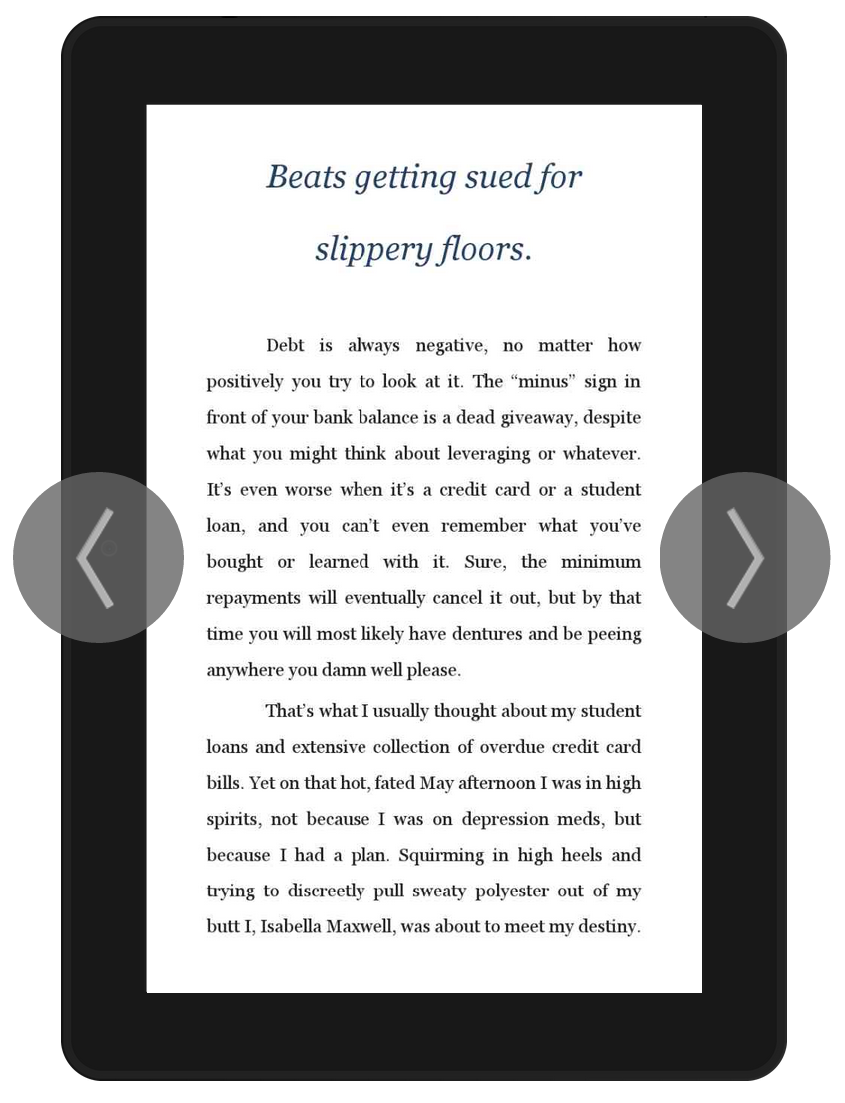
The text has been uploaded! No more editing! (Unless of course one of you points out a really stupid mistake and I fix it, but let’s just keep it between friends, okay?). This is what it will look like on a Kindle device:

Screenshot (9)

I could have published it already, but I just have to have one more fiddle with the cover image. I’m going to bed now, along with all other Australians, but will be up bright and early to finish it up. That’s if I can sleep at all 🙂

34 Comments

Filed under Self-publishing and marketing