Category Archives: Self-publishing and marketing

Look who’s got a proper author page!

Actually, I now have three author pages…all part of my marketing ploy strategy. Here they are:

All complete with the new profile photo:

Ana Spoke official photo (2)

My previous profile photo took “profile” a little too literally. The new one was taken by my friend who just happens to be a brilliant professional photographer. Have a look at some other portraits taken by Rebecca Ramage.

Now, for some quick how-tos:

So, what do you do if you don’t have a photographer friend or a ton of money to spend on a pro? Try Starnow. It’s a website for all kinds of performance professionals – I’ve used it when I had aspirations of becoming an actor and have scored well over 40 film roles. I have also used it before to find a photographer – I simply posted an ad asking to collaborate with photographers and make up artists, and expressions of interest poured in. You see, photographers just starting out need to build their portfolios, so they are looking for models all the time. Spice up your ad by mentioning that you’re an author and watch your inbox explode! The cost is very reasonable, just a few bucks a month (I was on a 6-month subscription and it was $46 for the entire 6 months, the last time I checked. Don’t know how much it would be if you wanted just one month).

Creating Amazon’s page was easy, although you have to register separately with Author Central. For Amazon’s own guide, have a look at All About Author Central. Easy-peasy. There was, however just one little drama to report.

I wanted to link this blog to the page, but it turned out you can’t just use your URL – you need to use your RSS feed. Confused? I sure was. Thank God, it only took a few minutes to find this WordPress guide on RSS links. Don’t stress if the blog posts don’t appear on your page right away – once I’ve published a new post, they all came through.

Goodreads was just a bit more complicated. You can’t just sign up as an author – you have to sign up for a “regular” account first. If you are a first-time author, you will likely have a heart attack when you search for your book and find that it is not in the 300-million-plus database. Take a breath – you can add it, but ONLY AFTER waiting for about a day. You can, of course, send a crazed email to helpdesk, and they will do it for you after politely explaining the whole waiting a day thing. You will also have to apply to be upgraded to an author account and wait again for approval. Or send the crazed email, whatevs.

So there you go. I mean, go – get your Goodreads page started. Trust me, when the time comes, you won’t be willing to wait a whole day.

61 Comments

Filed under Self-publishing and marketing

Marketing gimmick #1: spam, delicious spam…

Shizzle, Inc got up to #23 on the free Top 100 in Humor on the weekend! In fact, it stayed in Top 100 the entire time, thanks to you my dear readers and supporters. I was overwhelmed to see all the messages on the blog and retweets on Twitter – thank you so much!!

I couldn’t be more excited. I mean, I could be, of course. Like, if Cohen brothers called me and told me they want to make Shizzle, Inc into a film, I would totally lose it. For now, I’m just trying to function as a normal, middle-age adult, with a job and other responsibilities. Trying to get through my workday without giggling like an idiot has been a challenge. Also, trying not to turn every conversation into a discussion of self-publishing is proving to be nearly impossible.

Back to the topic at hand. Oh, the exciting times of marketing my novel! Most other writers blog about how much they hate this part of the writing-publishing projects, but I don’t get it. I can’t wait to implement my marketing strategy and see what results it may bring. Although, to tell the truth, I don’t have a strategy per se, at least not yet. All I have is a long list of gimmicks I’m going to test and blog about.

Which brings me back to the delicious spam. Ok, so maybe it’s not delicious, but I hope mine has been at least palatable. Ever since Shizzle, Inc was released on 4 September, I have been sending out 5 Twitter messages per day, each with a quote from Shizzle, Inc and a link to Amazon Kindle. My hope was that because they are entertaining, they will not piss off my followers. Here’s what a couple of them looked like:

Tweet 1Tweet 2Tweet 3

So, how did I do by spamming the entire world with these quotes and passive-aggressive attempts to get unsuspecting folk to buy my novel?

When I’ve looked at Twitter Analytics statistics, my first thought that the this particular gimmick backfired. Yes, the average number of views went up to 7,200 per day. Over 7 thousand views each and every day! In the previous weeks, my average views per day were around 4 thousand. So far so good, right?

Well, not exactly. These quotes/links did not get very many likes or retweets. In fact, the average rate of engagement dropped from my long-term average of 4-5% to about 2.1%. That’s an indicator of how many people have actually engaged with the tweet by either retweeting it, liking it, clicking on the link, or viewing my profile.

Quick math:

7,200 views * 2.1% engagement = 151 engagements

4,000 views * 4% engagement = 160 engagements

I stopped giggling long enough to consider abandoning this gimmick, until I checked how many “link clicks” I got. And this is where I finally saw some good news: the number of link clicks per week jumped from an average of 100 to 293. People actually clicked on the links! Considering that an average cost per click in advertising campaigns is $0.50, I’ve saved about $150 on advertising during the last week alone.

So I’ve decided to continue with this for now, unless you tell me that you’re sick of seeing quotes from Shizzle, Inc. In case you’re interested, I am doing it using a free version of Buffer – a website that lets you schedule tweets ahead of time. The free version lets me schedule up to 10 tweets and I can choose to send all 10 of them in one day, if I want to.

I’ve reduced the number of these spammy tweets to 4 per day – I will let you know what effect it will have on the number of engagements and link clicks. Most importantly, I will let you know the effect it will have on the number of sales. Stay tuned – I’m working on a post revealing exactly how many sales it took to get into the Top 100 list – the number may surprise you!

37 Comments

Filed under Self-publishing and marketing

5 stars for Shizzle, Inc!

I’ve been waiting for this milestone with bated breath – first independent review on Amazon.  Imagine the surprise of waking up to five gold stars:

image

The reviewer read the book in one night and “never laughed so hard in my life.” I’ve never squealed so much in my life 🙂 Can’t stop reading and re-reading it 🙂 Thank you so much, Dear Reader.

Have a great weekend, everyone. I gotta go read the review. Just this one last time…

73 Comments

Filed under Self-publishing and marketing

Shizzle, Inc is on Amazon Kindle bestseller list!!!

Aaaaaa!!! I was just climbing into bed to start working on my blog tour spreadsheet and decided to stare at my Amazon link one more time. I’m tired after a full day of spreadsheeting and bullshitting at work, so I thought seeing Isa’s face would give me the much-needed boost. Then I noticed this:

Screenshot (13)

This must be some kind of a mistake, I thought. So I clicked on a link, which took me to Top 100 Paid Titles in Humour. And there she was, my creation, with a number 72 next to it:

Screenshot (12)

I’m speechless. Good thing that I can still type, so that I can “say” thank you to those who bought my book. Regardless of what happens next, you’ve made my dream come true.

Big, big hugs.

Ana

84 Comments

Filed under Self-publishing and marketing, Shizzle, Inc.

Quick How-to: download a free Kindle app

Hi, everyone,

I’m so glad to hear that my little post on using an image widget to link to your Amazon book has helped so many people! I thought I would share with you how I’ve used the exact same process to make a link to the Kindle download page. Several people have asked me for a print copy of Shizzle, Inc because they don’t have a Kindle. I’m about to embark on a process of publishing a paperback, but you may not be aware that you no longer have to buy a Kindle. You can download a free Kindle app  for your smartphone or tablet.

I have put a link to the above Kindle download page into my sidebar as well, right below the link to Shizzle, Inc on Amazon.

Hope this helps too!

12 Comments

Filed under Self-publishing and marketing

Quick How-To: adding a link to Amazon from your WordPress.com blog

You may have noticed that at the top of this blog’s right-hand sidebar there’s now a pic of the Shizzle, Inc cover with an invitation to download. If you click on it, it will take you straight to Amazon Kindle (the American one).

You may also wonder why I haven’t done it to begin with, as soon as the novel was published. The answer is, I couldn’t. In my naivete, I assumed that there would be an easy-to-use widget like the one WordPress.com has for Goodreads, but there isn’t one. I don’t know why. Maybe WordPress and Amazon have had a falling out, Like Paris Hilton and Nicole Richie. All I know is that setting up this little link was a pain.

I won’t take you through everything that I had to go through – suffices to say that there’s A LOT of useless, outdated advice out there. In summary, THIS WILL NOT WORK:

  • Trying to insert HTML code, as per Kindle own instructions. This is probably meant for WordPress.org websites.
  • Trying to use Text Widget.
  • Trying to use any other widget, like Goodreads, and posting a url somewhere. (Ok, so it was a stupid idea, but innovative!)
  • Crying.

JUST DO THIS:

1.  Add an image of your cover to your media library (see Media in Admin sidebar).

2.  Add an Image Widget (go to Appearance – Widgets in Admin sidebar). The dialog box will look like this:

Capture of image widget

3.  Put a widget title in, if desired. I put in “Download Shizzle, Inc.

4. Now go back to your media library, find your cover image and double-click on it. You will see this:

Capture of image in image library

See the box in the top right corner? Copy THAT url (ignore the permalink or the “shortlink”).

5. Paste the url in your Image Widget.

6. Save and move the widget up in your sidebar (if desired).

7. Go back to your website and admire the results!

Hope this has helped or will help you in the future. It will certainly help me when I get to post my second novel, cause I’m guaranteed to forget it all by then.

51 Comments

Filed under Self-publishing and marketing

It’s alive!


I mean, live! Isa Maxwell’s come to life on Amazon Kindle

Thank you Dr. Meg for checking and letting me know, otherwise I would have been sulking for hours…

Thank you so much, everyone, it’s finally happened. Have a great day/night, I’m off to buy a lottery ticket!


60 Comments

Filed under Self-publishing and marketing

Almost there…grrrr!

I have hit “Publish”! Slightly anti-climatic, because now I have to WAIT FOR 12 HOURS!!!

I think I’ve read about it before, but chose to forget that the title does not appear in Amazon instantly. They’re probably checking it for profanities (check!), drug use (check!), and smut (not really, but certainly sex references). Not sure why, considering the stuff that gets published these days. I would probably give it a PG-13 rating.

At least I get to show you my slightly improved (I think) cover:

FINAL COVER September 5

I have given up on adding color to my name – every single one I’ve tried made my last name completely disappear from the thumbnail. Finally I decided to go with “simpler is better” and made it all white. I’ve played with the whole thing for a couple of hours, but the only other change that’s happened is the title font. I’ve ended up printing the cover, and then tracing the name with a flat-tip marker, hopefully giving it a bit more “handwritten” look. Then it was a matter of scanning it in and changing color to white, and bam! My own font 🙂

Ok, so it’s once again “T-minus 12 hours and counting.” Damn it!

50 Comments

Filed under Self-publishing and marketing, Shizzle, Inc.

T-minus 12 hours and counting! Plus some random Kindle formatting tips..

Today I’ve uploaded Shizzle, Inc text to Amazon. My whole body was shaking as I did it. About half a dozen times.

Turns out that my premonitions about formatting mishaps were true. There were not that many, and I resolved everything in a space of a couple of hours, but here’s what I’ve learned in the process:

First, the good news:

  1. Uploading your book to Amazon is RIDICULOUSLY EASY. Fear not if you’ve never done it before. Assuming you already have an Amazon account you’ve used to purchase books. Otherwise you have to set one up, and it would probably take twice as long. It’s literally a couple of pages and takes about 10-15 minutes. You can preview your text, make any changes in your Word file and upload the new version (takes about a minute).
  2. Note: you can’t have multiple accounts with Amazon. If you use a pen name, it would be a matter of setting up an author page under the pen name, which I’m yet to do.
  3. If you are a first timer, like me, use Word to write your book. I can’t really talk about Scrivner since I’ve never used it, but why complicate something that is already complicated enough? I credit the relatively easy conversion of my text with the fact that I’ve used good ol’ Word.

The not so good news:

  1. I’ve spent an exuberant amount of time fussing over the drop caps and inserting them into text at the beginning of chapters and then again at scene changes. I’ve previously used asterisks in the middle of the page to signal a change of scene. Finding and replacing them was a lot of work, so you can imagine my disappointment when in Kindle they displayed so far below the first line, they looked like “buried caps.” I tried googling solutions, but the consensus was JUST DON’T DO IT. So I spent more time going back and trying to figure out how to highlight the first line/first letter. In the end, I’ve decided to do nothing.
  2. You don’t need to stress over the fonts because Kindle will translate whatever carefully chosen font into its own standard. This could even be considered good news, if IT WAS BROUGHT TO MY ATTENTION LAST WEEK, before I spent hours researching, changing, trying out, and changing the font again.
  3. Make sure that you use the style “Headings” for your chapter names and not “Chapters”. Otherwise your table of contents will be empty. Hey, it’s an easy mistake to make! I actually decided to take “Chapter XX” out altogether in the end, and I think it makes for a cleaner, simpler presentation.

The most amazing news:

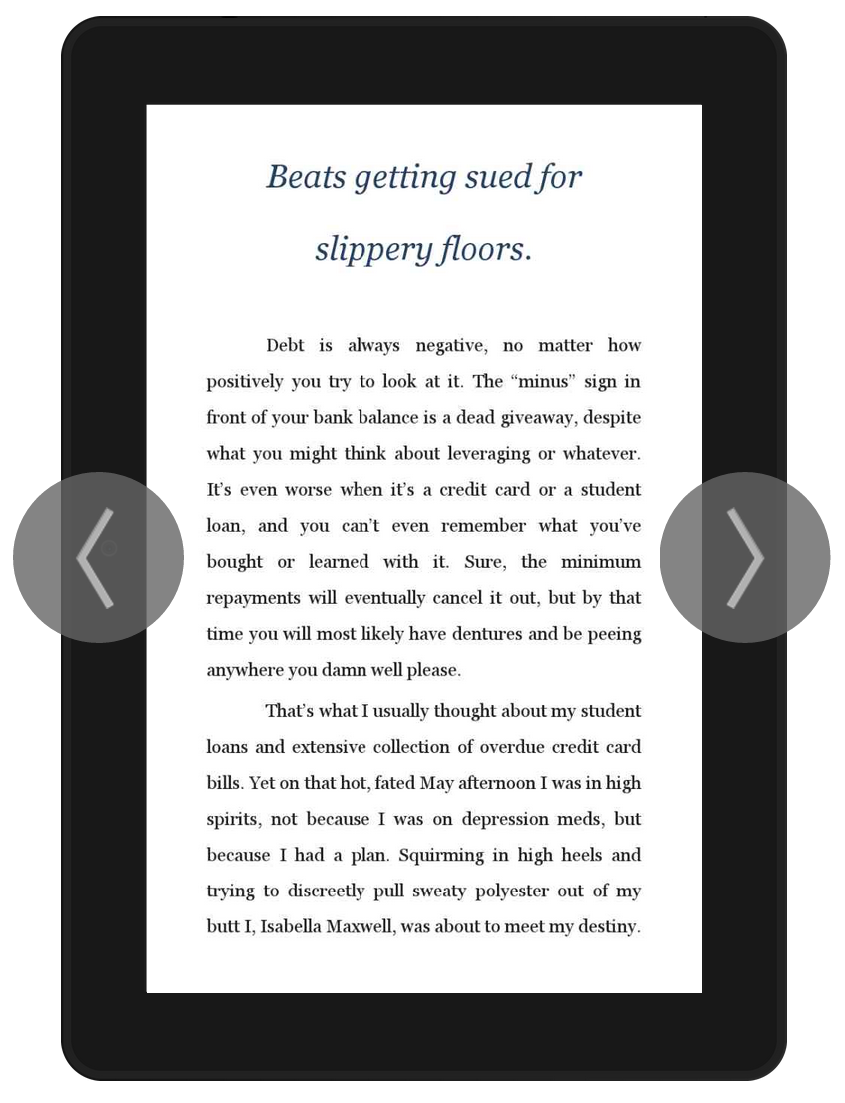
The text has been uploaded! No more editing! (Unless of course one of you points out a really stupid mistake and I fix it, but let’s just keep it between friends, okay?). This is what it will look like on a Kindle device:

Screenshot (9)

I could have published it already, but I just have to have one more fiddle with the cover image. I’m going to bed now, along with all other Australians, but will be up bright and early to finish it up. That’s if I can sleep at all 🙂

34 Comments

Filed under Self-publishing and marketing

Imprint or stuff it?

I’m experiencing a major analysis paralysis. Just as the target is within reach, I seem unable to decide whether to get an ISBN from Amazon, or to go the more complicated route of buying my own ISBNs and registering as a publishing company.

The easiest way is just to upload the file and let Amazon take care of everything. The ISBN would be free, the only obvious (to me) downside is that “Amazon Digital Services” will appear as a publisher, and anyone “in the know” will immediately recognise the novel as self-published. Like it or not, there’s still a stigma associated with self publishing. I can also buy a pack of ISBNs, but then the publisher will be me, and again very obviously self-published. Creating a company would give me an “imprint” and ability to use that imprint for marketing (to be honest, I don’t fully understand the importance of this at the moment!)

Does it really matter? I mean, I was browsing a few self-published titles for research on how to format headings and came across one with track changes still visible in the table of contents. This novel was in top 10 in its category! Maybe readers truly don’t care about proofreading?

On the other hand, there are a number of online resources passionately advocating registering your own ISBN, like this Pearls Before Swine blog. Some, like the well known Book Designer, even advocate setting up your own publishing company.

Should I go the whole way and set up “Awesome Big Book Publishing Company”, or just get this project done without driving myself insane? Would I limit my future options by taking the easy route now? Should I take a nap? Probably the nap first…

74 Comments

Filed under Self-publishing and marketing