Tag Archives: author page

Quick How-To: add a static welcome page to WordPress.com without losing your blog

Hi, guys!

I’ve been MIA for a couple of weeks, and for a good reason – as you’ve probably noticed, I am now running #ComedyBookWeek. It’s been a full-time job for the last month or so, what with setting up an official website, approaching 100 book bloggers, and gathering 112 (and counting) books to participate. Not to mention the daily highlights and social media – luckily I’m on leave right now, otherwise, I’d have a nervous breakdown!

Still, I had to take a little timeout and post this How-To, because it took me forever to figure out what should take you five minutes to do. If you’ve looked on #ComedyBookWeek webpage lately, you might have noticed that the front page is now a static one, showcasing all the books on offer. To see the actual blog posts, you now need to click on the “Blog” tab at the top. This makes the page look more professional from the event point of view, rather than the WordPress standard landing page being a blog. Plus, it gives more weight to the books on offer. Incidentally, this is what most professional authors do – when you go to their website, the welcome page is about the author and their books. I am going to revamp this blog in the same way, so I wanted to give you heads up and write down how I did it for #ComedyBookWeek webpage .

Please follow the steps below exactly – if you only assign the front page, you will notice that your blog will DISSAPEAR! And we don’t want that.

Here are the steps:

  1. Create a landing Page that you want to be your “front” page. For this blog, it will be my “About Ana” page. Here are all the pages used in comedybookweek.com:Add page
  2. Create a “Blog” page. Just trust me – add a new page, call it “Blog” or whatever you want, but DON’T WRITE ANYTHING in the body/text box.
  3. Now go to your WP Admin, and in Settings-Reading, assign two static pages as shown below. Assign your welcome page to “Front” and your empty “Blog” page to “Posts.”Reading settings
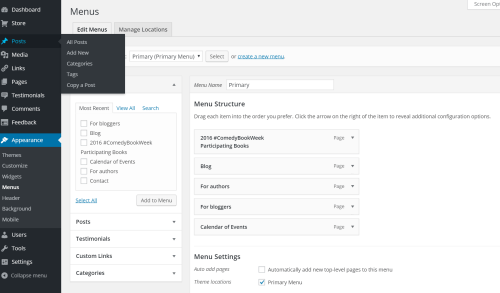
  4. In Appearance-Menus, add pages and rearrange them as desired. Here’s what #ComedyBookWeek menu looks like:Menus

That’s it!

You’re welcome 🙂

22 Comments

Filed under Self-publishing and marketing

And this little Amazon stayed home…

Did you know this??? Not only you have to make a separate Author Page for each of the ever- multiplying Amazons, the reviews of your book may or may not cross-appear on other sites?

I certainly didn’t, at least not until I started drafting a review request this afternoon (a post on how I plan to get “official” reviews is coming up soon). In copying Rachel Abbott’s flyer, I noticed that she posted different numbers for the American and British sites.

Huh?

Well, whaddaya know? I thought Shizzle, Inc had 26 reviews, but that’s on the US siteUK site has 5 reviews, which are the same as on the US site. I don’t know if those kind souls posted their reviews twice, or if Brits are ahead of others in terms of integration. Aussies haven’t bothered to post any reviews, and Canadians didn’t get the joke. India is also laying low – c’mon, guys, I know that at least three of you have bought it!

Not only that, the book has different ratings on each of the sites! At this exact moment sales are slow, as none of the January paid promos kicked in yet and I’m selling about 0.5 copies per day on the back of Twitter quotes. The ratings are as follows:

US: 465 in Satire

UK: 385 in Satire

Canada: 259,502 overall, doesn’t have a subcategory

Australia: 1,234 in Humour

India: 58,750 overall – best overall rating.

Fascinating, isn’t it? While the highest I ever got was #9 on the US Amazon bestseller list, I may have been the bestselling author in UK!

Anyway, just thought you should know. Check, quick – you might be a bestselling author in India!

60 Comments

Filed under Self-publishing and marketing

Look who’s got a proper author page!

Actually, I now have three author pages…all part of my marketing ploy strategy. Here they are:

All complete with the new profile photo:

Ana Spoke official photo (2)

My previous profile photo took “profile” a little too literally. The new one was taken by my friend who just happens to be a brilliant professional photographer. Have a look at some other portraits taken by Rebecca Ramage.

Now, for some quick how-tos:

So, what do you do if you don’t have a photographer friend or a ton of money to spend on a pro? Try Starnow. It’s a website for all kinds of performance professionals – I’ve used it when I had aspirations of becoming an actor and have scored well over 40 film roles. I have also used it before to find a photographer – I simply posted an ad asking to collaborate with photographers and make up artists, and expressions of interest poured in. You see, photographers just starting out need to build their portfolios, so they are looking for models all the time. Spice up your ad by mentioning that you’re an author and watch your inbox explode! The cost is very reasonable, just a few bucks a month (I was on a 6-month subscription and it was $46 for the entire 6 months, the last time I checked. Don’t know how much it would be if you wanted just one month).

Creating Amazon’s page was easy, although you have to register separately with Author Central. For Amazon’s own guide, have a look at All About Author Central. Easy-peasy. There was, however just one little drama to report.

I wanted to link this blog to the page, but it turned out you can’t just use your URL – you need to use your RSS feed. Confused? I sure was. Thank God, it only took a few minutes to find this WordPress guide on RSS links. Don’t stress if the blog posts don’t appear on your page right away – once I’ve published a new post, they all came through.

Goodreads was just a bit more complicated. You can’t just sign up as an author – you have to sign up for a “regular” account first. If you are a first-time author, you will likely have a heart attack when you search for your book and find that it is not in the 300-million-plus database. Take a breath – you can add it, but ONLY AFTER waiting for about a day. You can, of course, send a crazed email to helpdesk, and they will do it for you after politely explaining the whole waiting a day thing. You will also have to apply to be upgraded to an author account and wait again for approval. Or send the crazed email, whatevs.

So there you go. I mean, go – get your Goodreads page started. Trust me, when the time comes, you won’t be willing to wait a whole day.

61 Comments

Filed under Self-publishing and marketing